Clipping a geojson file

Someone knows what im doing wrong with the clipping(i see the cesium tutorial in cesium page , but for sure im missing something) ? Or some other way to clip a geojson file. Thanks

import {
Ion,
Viewer,
Terrain,
createGooglePhotorealistic3DTileset,
GeoJsonDataSource,
IonResource,
ClippingPolygonCollection,
ClippingPolygon,
Cartesian3,
Math as CesiumMath,
Color,
HeadingPitchRange,
SceneMode
} from “cesium”;
import “cesium/Widgets/widgets.css”;
import “./css/main.css”;

// — CONFIGURAÇÕES —
Ion.defaultAccessToken = xxxx

// ID do GeoJSON de Portugal no Cesium Ion
const FOOTPRINT_ID = xxxxx;

async function startPortugalClippedView() {
const viewer = new Viewer(“cesiumContainer”, {
terrain: Terrain.fromWorldTerrain(),
sceneMode: SceneMode.SCENE3D,
timeline: false,
animation: false,
baseLayerPicker: true,
geocoder: true,
shouldAnimate: true,
});

// Mostrar o globo
viewer.scene.globe.show = true;
viewer.scene.skyAtmosphere.show = true;

// — Carregar Photorealistic 3D Tiles —
let googleTileset;
try {
googleTileset = await createGooglePhotorealistic3DTileset({
onlyUsingWithGoogleGeocoder: true
});
viewer.scene.primitives.add(googleTileset);
} catch (error) {
console.log(Erro ao carregar Photorealistic 3D Tiles: ${error});
}

// — Carregar footprint de Portugal —
let footprint;
try {
const resource = await IonResource.fromAssetId(FOOTPRINT_ID);
const dataSource = await GeoJsonDataSource.load(resource, { clampToGround: true });
viewer.dataSources.add(dataSource);

footprint = dataSource.entities.values.find(entity => Cesium.defined(entity.polygon));
footprint.polygon.outline = true;
footprint.polygon.material = Color.YELLOW.withAlpha(0.3);

// Zoom inicial para Portugal
const cameraOffset = new HeadingPitchRange(
  CesiumMath.toRadians(0),
  CesiumMath.toRadians(-30),
  200000.0
);
viewer.zoomTo(footprint, cameraOffset);
viewer.homeButton.viewModel.command.beforeExecute.addEventListener((e) => {
  e.cancel = true;
  viewer.zoomTo(footprint, cameraOffset);
});

} catch (error) {
console.log(Erro ao carregar GeoJSON: ${error});
}

// — Criar Clipping Polygon para mostrar apenas Portugal —
if (footprint && googleTileset) {
const positions = footprint.polygon.hierarchy.getValue().positions;
const clippingPolygons = new ClippingPolygonCollection({
polygons: [new ClippingPolygon({ positions })],
edgeColor: Color.YELLOW,
edgeWidth: 2.0
});

// Inverso para mostrar apenas dentro de Portugal
clippingPolygons.inverse = true;

// Aplicar ao tileset
googleTileset.clippingPolygons = clippingPolygons;

}
}

startPortugalClippedView();

Hi there,

I think you need to to a few things first;

  1. Clean up the code, the formatting is all over the shop and really hard to read. Better still, create a Sandcastle version of it that demonstrate working code (working as in ‘runs’, not necessarily as in works the way you want it to work :slight_smile: )
  2. explain what you’re trying to do a bit better. What does “clipping a geojson file” mean? Are you clipping on entities after the rendering, or do you mean some kind of filtering in the parsing phase? What’s the problem you’ve got?

Cheers,

Alex

Thanks for attention mate , and sorry for confusion i didnt know that we have a option that we can write code .

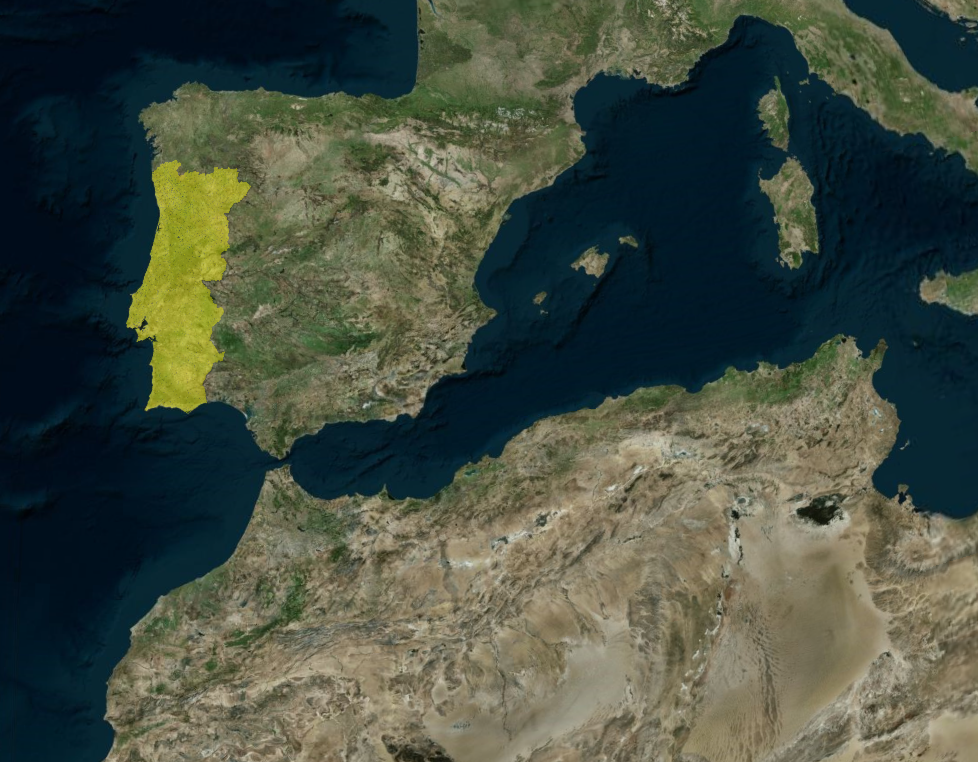
So what i want to do, its like hide all word with a mask and only show what is inside of the border of my geojson file, in this case is Portugal . I will put a image how i like to put my output vs what its my acctual output

SandCastle CODE

import * as Cesium from "cesium";
import Sandcastle from "Sandcastle";

const viewer = new Cesium.Viewer("cesiumContainer", {
  timeline: false,
  animation: false,
  sceneModePicker: false,
  baseLayerPicker: false,
  geocoder: Cesium.IonGeocodeProviderType.GOOGLE,
  // The globe does not need to be displayed,
  // since the Photorealistic 3D Tiles include terrain
  globe: false,
});

// Enable rendering the sky
viewer.scene.skyAtmosphere.show = true;

const currentTime = Cesium.JulianDate.fromIso8601(
  "2020-01-09T23:00:39.018261982600961346Z",
);
viewer.clock.currentTime = currentTime;

// Add Photorealistic 3D Tiles
let googleTileset;
try {
  googleTileset = await Cesium.createGooglePhotorealistic3DTileset({
    // Only the Google Geocoder can be used with Google Photorealistic 3D Tiles.  Set the `geocode` property of the viewer constructor options to IonGeocodeProviderType.GOOGLE.
    onlyUsingWithGoogleGeocoder: true,
  });
  viewer.scene.primitives.add(googleTileset);
} catch (error) {
  console.log(`Error loading Photorealistic 3D Tiles tileset.
  ${error}`);
}

// Load a GeoJSON file with positions defining the project footprint
let footprint;
try {
  const resource = await Cesium.IonResource.fromAssetId(2533131);
  const dataSource = await Cesium.GeoJsonDataSource.load(resource, {
    clampToGround: true,
  });

  viewer.dataSources.add(dataSource);

  footprint = dataSource.entities.values.find((entity) =>
    Cesium.defined(entity.polygon),
  );
  footprint.polygon.outline = false;

  // Zoom to data location, and set the home view
  const cameraOffset = new Cesium.HeadingPitchRange(
    Cesium.Math.toRadians(95.0),
    Cesium.Math.toRadians(-75.0),
    800.0,
  );
  viewer.zoomTo(footprint, cameraOffset);
  viewer.homeButton.viewModel.command.beforeExecute.addEventListener((e) => {
    e.cancel = true;
    viewer.zoomTo(footprint, cameraOffset);
  });
} catch (error) {
  console.log(`Error loading geojson. ${error}`);
}

// Add a clipping region based on the loaded project footprint
const positions = footprint.polygon.hierarchy.getValue().positions;
const clippingPolygons = new Cesium.ClippingPolygonCollection({
  polygons: [
    new Cesium.ClippingPolygon({
      positions: positions,
    }),
  ],
});
googleTileset.clippingPolygons = clippingPolygons;

// Add tileset of proposed project design
let buildingTileset;
try {
  buildingTileset = await Cesium.Cesium3DTileset.fromIonAssetId(2533124);
  viewer.scene.primitives.add(buildingTileset);
} catch (error) {
  console.log(`Error loading design tileset.
  ${error}`);
}

Sandcastle.addToggleButton("Show proposed design", true, function (checked) {
  buildingTileset.show = checked;
});

Sandcastle.addToggleButton("Show footprint", true, function (checked) {
  footprint.show = checked;
});

Sandcastle.addToggleButton("Clip target location", true, function (checked) {
  clippingPolygons.enabled = checked;
});

Sandcastle.addToggleButton("Inverse clip", false, function (checked) {
  clippingPolygons.inverse = checked;
});

link for output in sandcastle Sandcastle | CesiumJS

MY code

// Token
Ion.defaultAccessToken = 

// Asset with my portugal geojson file
const FOOTPRINT_ID = 3944688;

async function startPortugalClippedView() {
  const viewer = new Viewer("cesiumContainer", {
    terrain: Terrain.fromWorldTerrain(),
    sceneMode: SceneMode.SCENE3D,
    timeline: false,
    animation: false,
    baseLayerPicker: true,
    geocoder: true,
    shouldAnimate: true,
  });

  // Show globe
  viewer.scene.globe.show = true;
  viewer.scene.skyAtmosphere.show = true;

  // Photorealistic 3D Tiles ---
  let googleTileset;
  try {
    googleTileset = await createGooglePhotorealistic3DTileset({
      onlyUsingWithGoogleGeocoder: true
    });
    viewer.scene.primitives.add(googleTileset);
  } catch (error) {
    console.log(`Erro ao carregar Photorealistic 3D Tiles: ${error}`);
  }

  //  footprint of Portugal ---
 
 let footprint;
  try {
    const resource = await IonResource.fromAssetId(FOOTPRINT_ID);
    const dataSource = await GeoJsonDataSource.load(resource, { clampToGround: true });
    viewer.dataSources.add(dataSource);

   footprint = dataSource.entities.values.find(entity => Cesium.defined(entity.polygon));
  footprint.polygon.outline = true;
  footprint.polygon.material = Color.YELLOW.withAlpha(0.3);

  const cameraOffset = new HeadingPitchRange(
    CesiumMath.toRadians(0),
    CesiumMath.toRadians(-30),
    200000.0
  );
  viewer.zoomTo(footprint, cameraOffset);
  viewer.homeButton.viewModel.command.beforeExecute.addEventListener((e) => {
    e.cancel = true;
    viewer.zoomTo(footprint, cameraOffset);
  });
  } catch (error) {
    console.log(`Erro ao carregar GeoJSON: ${error}`);
  }

  // --- Clipping Polygon to show Portugal ---

  if (footprint && googleTileset) {
    const positions = footprint.polygon.hierarchy.getValue().positions;
    const clippingPolygons = new ClippingPolygonCollection({
      polygons: [new ClippingPolygon({ positions })],
      edgeColor: Color.YELLOW,
      edgeWidth: 2.0
    });

    // Aplly inverse to only show the geojson file 
    clippingPolygons.inverse = false;

    // Applly tileset
    googleTileset.clippingPolygons = clippingPolygons;
  }
}

startPortugalClippedView();

* I want to aplly the inverse clipping

Cheers , Dizz

Hiya,

Your first code example, is that the working project? So, showing models in an environment, and then you’ve got a larger GeoJson file with labels (or other things) that you want to bring to the scene but only if they appear inside the clipped area?

I think there’s no such thing as clipping for this, or, rather, it sounds like the wrong approach. Now, it depends on how large this GeoJson file is, but you could simply import it, turn all entities to no_show (they would all exist in a entityCollection, so it’s easy to put them all to show:false), and then;

  1. Get a list of all entities position (I’d use a Map() over the entityCollection )
  2. Get all positions of the clipping polygon (possibly do a reverse hull if it’s a very odd shape, or you want to quantize it better)
  3. Calculate which entity positions are inside the clipping polygon
  4. Loop over the entities to turn them on (or off, depending)

Personally I’d apply tags to entities for this (this is not a Cesium feature, btw, but you can easily create one or find a library that does something similar, for example inject a ‘$tags:string into entities, collect tags into their own Map()s, and some async looping over entities to perform different operations on them), ie. a tag for different models or different projects or regions or whatever you’re interested in, and map them to entities. Now you’ve got the power to manipulate entities over certain geographical regions. In fact, I think there was a recent library someone spoke of here that did something like this? Search for a plugin that can do multiple terrain models at the same time, can’t remember the name right now, maye a couple of months back?

For practical reasons I’d also apply a clustering on the global entities with a medium range of roughly the median size as your clipping polygon or other projects, like 1km (would make things fast and allow for some global movement).

Cheers,

Alex