Hello everyone,
I am a PhD student using CesiumJS for a research project. I’m new to the Cesium ecosystem, and my background is not in computer graphics, so I’ve been learning as I go.
My objective is to take a classified point cloud and its corresponding 3D tiled mesh model and integrate the classification data into the mesh. The final application in CesiumJS will allow users to style, select, and query these classified zones on the model. (Of course, these are later-stage considerations. For now, my main difficulty is migrating this information.)
My data is a hierarchical 3D Tileset with a main tileset.json that references many nested .glb files, which is the correct structure for performance via LOD. I understand that to achieve my goal, I probably need to enrich each individual .glb file with metadata using the EXT_mesh_features and EXT_structural_metadata extensions.
My core challenge has been the lack of a clear toolchain to automate this data enrichment process.
My core frustration comes from a disconnect between the official Sandcastle demos and the reality of the data pipeline. In the demos, it appears incredibly straightforward: with just a few lines of JavaScript, one can access rich metadata, highlight specific features, and apply complex styling.
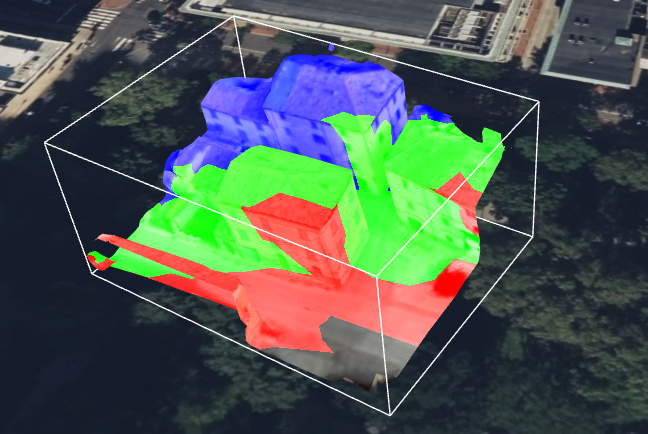
Failing to solve this, I also tried different solutions, like the ClassificationPrimitive that Cesium provides. As you can see from the images below, it produces nice results.
ClassificationPrimitive
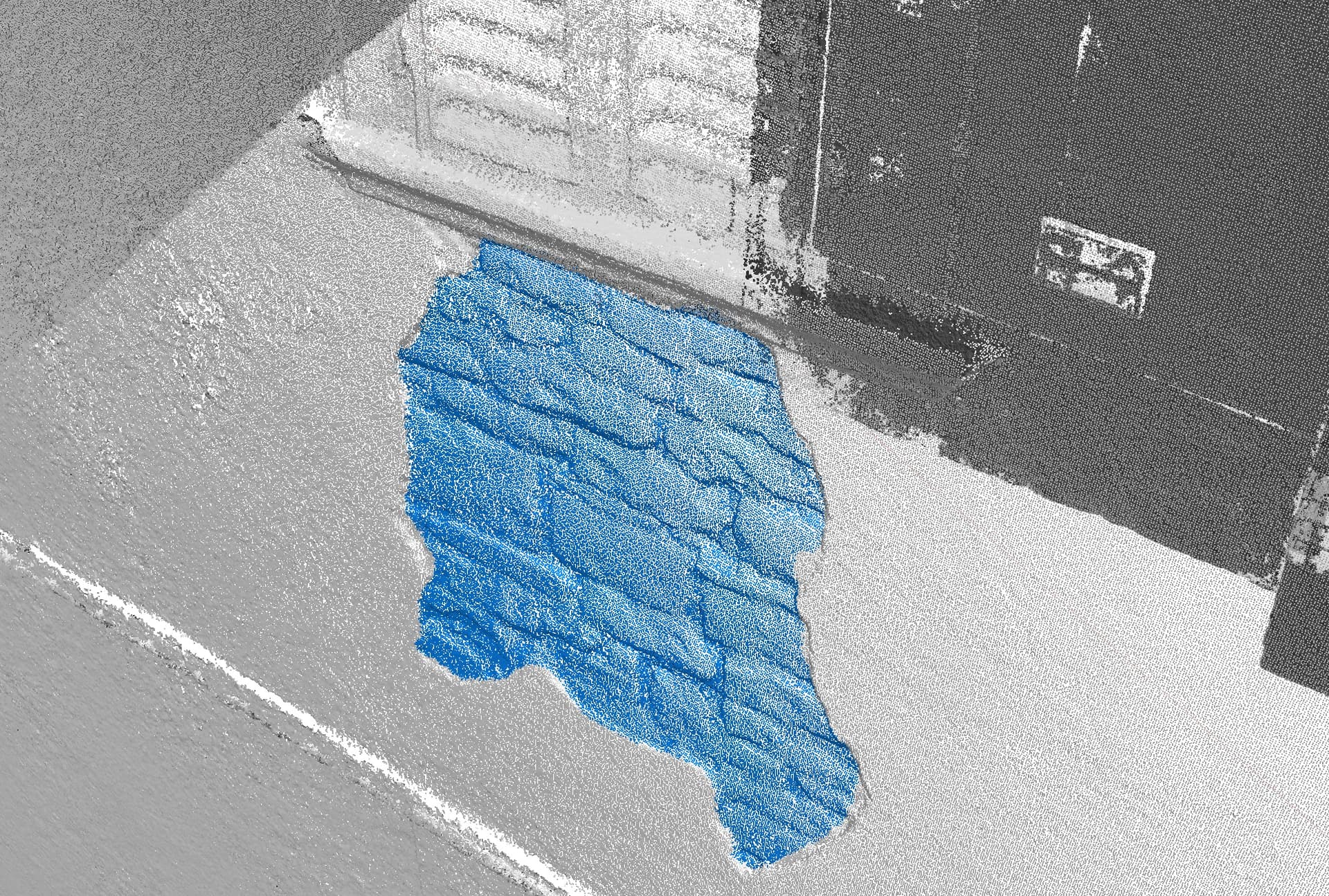
dense cloud classification in blue

classification Primitive CesiumJS on tiled model in yellow
Since creating a predefined solid geometry wasn’t feasible due to the undefined area of interest, I generated small, individual spheres at the coordinates of the classified point cloud (about 5k coordinates). The problem arises with large areas of interest. This solution becomes impractical and, understandably, crashes everything.
Therefore, I would like to return to the extensions approach, also to leverage LOD and minimize draw calls to optimize rendering, which I was not achieving with the ClassificationPrimitive method.
I would start with the structure of my tiled model because it may not conform to some examples shown in previous forum posts, which often featured a single, unified mesh. In contrast, my tiled model has a hierarchical structure with many nested glb files that it references (along with other tileset.json files).
tileset.json
│
└── data/
    │
    ├── lod_0/
    │   └── root.glb
    │
    ├── lod_1/
    │   ├── 0.glb
    │   ├── 1.glb
    │   └── tileset.json
    │
    └── lod_2/
        ├── 2.glb
        ├── 3.glb
        ├── 4.glb
        └── tileset.json
...
// This refers to a hypothetical attachment showing a hierarchical JSON structure of glb files
I studied the distinction between 3D Tiles 1.0, which introduced the Batched 3D Model (b3dm) format, and 1.1, where the feature identification mechanism is moved into the glTF specification itself. This decouples the functionality from 3D Tiles and makes it available to any application that uses glTF. And for this reason I have also tried converting the various glb files to glTF and resetting the tileset.json, noting that the resolution and conformity of the resulting model were not altered.
Based on the official documentation and references, such as: https://github.com/CesiumGS/3d-tiles and https://github.com/CesiumGS/3d-tiles/tree/main/specification/TileFormats/glTF I’ve learned that this requires both EXT_mesh_features in conjunction with its complementary extension EXT_structural_metadata.
I understand that the EXT_mesh_features extension is a JSON object defined at the mesh.primitive level. Since a single mesh in a glTF file can be composed of multiple primitives (e.g., to represent parts with different materials), each primitive can have its own Feature ID definitions, allowing for granular control over feature identification
I understand that there are three main methods for assigning these IDs:
- Feature ID Attributes: Feature IDs are stored as a per-vertex attribute within the mesh geometry (FEATURE_ID).
- Feature ID Textures: Feature IDs are encoded in the color channels of a texture image.
- Implicit Feature IDs
I suppose I should use the Feature ID Attributes and run code like this to apply a style to the areas of interest:
const tileset = viewer.scene.primitives.get(0); // loop on index

tileset.style = new Cesium.Cesium3DTileStyle({
  color: {
    conditions: [
      ["${Window} == 300", "color('purple')"],
      ["${Window} == 200", "color('red')"],
      ["${Door} == 100", "color('orange')"],
      ["${Door} == 50", "color('yellow')"],
    ],
  },
});
Following the definition at https://github.com/CesiumGS/glTF/tree/3d-tiles-next/extensions/2.0/Vendor/EXT_mesh_features, I understand how Feature IDs work and how they are associated, but I don’t understand how to actually create them. What tools should I use?
I tried using Blender. Following some quick instructions online, I attempted to apply these modifications by integrating a new material into the mesh in the glTF. However, these changes were not reported or recognized by CesiumJS in my code. This is not enough to make Cesium read/interpret the data. I’m not even sure if the Blender glTF exporter supports custom attributes.
I’m having difficulty even generating a basic demo model, let alone creating an automated workflow that integrates data from the point cloud into all the glTF files associated with a tileset.json model.
I have a couple of questions:
-
Do you recommend that I treat this as a single mesh (by converting a single OBJ model to glTF), even if it means losing the tiled LOD properties? I’ve noticed that sometimes a glTF model is the union of two distinct meshes combined.
-
I assume I need to apply this
EXT_process to eachglTFfile that my tileset is composed of. Is that correct?
As an example, here is a starting tiled model that I’ll be applying these operations to.
demo.zip (261.9 KB)
Any guidance or recommended practices would be immensely helpful in bridging this knowledge gap.
Thank you so much for your time and help.
Best regards,
Leonardo