There is a lot of information in that post. And there are many degrees of freedom for how exactly metadata should be structured or assigned to models. There is certainly … “room for improvement” … in terms of guidance about metadata. Some of this is tracked in Tools and processes for assigning and editing IDs and metadata · Issue #801 · CesiumGS/3d-tiles · GitHub , with examples for questions that have been asked previously. Some of these questions may be relevant for your use-case as well. But given the many degrees of freedom and the huge variety of possible data sets and their metadata, finding the “best” solution for a certain task is certainly an engineering process.
I’ll try to address some of the points that you brought up. Parts of my response may be very “high-level” and generic. Others may (“intentionally”) be too specific. In some way, this is about narrowing down the search space for a solution.
My objective is to take a classified point cloud and its corresponding 3D tiled mesh model and integrate the classification data into the mesh. The final application in CesiumJS will allow users to style, select, and query these classified zones on the model.
The exact way of how users are supposed to interact with this data may affect the actual approach. For example, it is a crucial difference of whether users should only visualize that data, or whether users should be able to interact with it in any way. To put it that way: Clicking&Picking is not so easy in CesiumJS, even though it may seem like a baseline requirement…
When you say that you want to “integrate the classification data into the mesh”, then this may warrant some further clarification. How are the point cloud and the mesh “connected” to each other? From the screenshot, it looks like there is the mesh and the classified point cloud, and the point cloud served as the basis for constructing the mesh. This would mean that each point of the point cloud essentially lies on the surface of the mesh (and the classification from that point should be used for ~“classifying the corresponding part of the surface of the mesh”) - is that about right?
My data is a hierarchical 3D Tileset with a main tileset.json that references many nested .glb files, which is the correct structure for performance via LOD.
One question here is how to structure the metadata in a way that “matches” the hierarchical representation of the mesh. From a quick inspection of the example data that you provided, it looks like this was really a “plain, classical LOD structure”, where each higher-level mesh is simply a simplified representation of the lower-level mesh.
One important point here is: When you want to transfer classification information from the point cloud to the mesh, and the point cloud is just a representation of the surface of the mesh, then it might be possible to use the same approach for all levels of detail. With a caveat: Depending on how much the mesh was simplified, the points from the point cloud may no longer be “close” to the surface of the (simplified) mesh…
(A slightly more abstract way of putting this: One could assign metadata to each level of detail, or one could assign it to the high-detail mesh and try to apply a simplification that takes the metadata into account - I’m not aware of tools that can easily accomplish the latter…)
My core challenge has been the lack of a clear toolchain to automate this data enrichment process.
There isn’t even a “non-clear toolchain”. And I understand what you refer to as the “disconnect between … Sandcastle… and data pipeline”. The sandcastle is pretty much focussed on showing the metadata and how it can be accessed in CesiumJS. But there is little to no documentation about where that metadata originally came from, how it was processed, and how it eventually ended up in these data sets. (These are the reasons why I opened the issue linked above…)
… this requires both
EXT_mesh_featuresin conjunction with its complementary extensionEXT_structural_metadata.
This may be true. But when you are only talking about classification then you might not actually need the EXT_structural_metadata extension. When the classification information is just a bunch of integer values (“0=Grass, 1=Stone, 2=Metal…” or so), then it could be sufficient to store these values as feature IDs using EXT_mesh_features.
I suppose I should use the Feature ID Attributes and run code like this to apply a style to the areas of interest:
Feature ID attributes sound like a viable approach, based on the description until now. The example that you posted uses Cesium3DTileStyle. I’d have to re-read and digest 3D Tiles Next Metadata Compatibility Matrix · Issue #10480 · CesiumGS/cesium · GitHub again to say how well this will work. Maybe a custom shader could be an alternative.
I tried using Blender. Following some quick instructions online, I attempted to apply these modifications by integrating a new material into the mesh in the glTF.
I have not actively tried out Blender for this. But as you may see in the issue (linked at the top), someone created an example for how to assign metadata in Blender: glTF2.0 in UE5.2, metadata "EXT_structural_metadata", "EXT_mesh_features" - #8 by m.kwiatkowski - I don’t know how viable this is for your task, and it certainly does involve some manual steps. But you might want to have a look at that.
Do you recommend that I treat this as a single mesh (by converting a single OBJ model to glTF), even if it means losing the tiled LOD properties? I’ve noticed that sometimes a glTF model is the union of two distinct meshes combined.
The demo data that you posted is very small. There is absolutely no reason to break a model with ~“a few kilobytes” into multiple LevelsOfDetail. As a ballpark: I wouldn’t bother introducing LODs for any model less than 1MB, maybe not even for 5MB. The LOD structure of 3D Tiles really shines when you have a model that has hundreds of MB, and you want to make sure that the user “immediately” sees a coarse version of the model, and the model is refined when zooming in.
It’s not clear how much data you will have eventually. Maybe this “demo” was only a small part, and your actual data has hundreds of MB. Then, you’d need to consider LODs. But as noted above, the metadata handling may become far more tricky then.
I’ve seen that the GLB data was generated with “Agisoft Metashape”. I don’t know which options this software offers, in terms of “LOD granularity”, or whether it allows LOD generation with custom attributes (like feature IDs).
I assume I need to apply this
EXT_process to eachglTFfile that my tileset is composed of. Is that correct?
Probably yes. But as you pointed out: It is not even clear which “process” that should be, or which tools should be used here.
Now, I’m going out on a limb. This part may be far too specific, or it might suggest that the goal is “easy to accomplish” - but this is only for illustration, and the devil is in the detail.
There is some support for the EXT_mesh_features extension in the 3d-tiles-tools. This is not part of a public API. But it might eventually become part of some library.
With this support, it is possible to assign metadata to glTF programmatically. I have attached an example that uses the 3D Tiles Tools to assign example metadata to glTF. What this does is
- it reads the glTF data (the
a.glbfrom your example) - it converts the glTF data into a
glTF-Transformdocument - it uses the implementation of the
EXT_mesh_featuresextension to assign feature IDs to the mesh primitives.- In the example, this is only a “dummy” function, called
setFeatureIdBasedOnPosition: It checks the position of a vertex, and depending on that position, assigns the feature ID 1, 2, or 3 to this vertex, based on the x-coordinate of the vertex. In you case, one could, in theory, use the classification value of the point from the point cloud that is closest to this vertex. Implementing that sensibly may involve a bit of work, though…
- In the example, this is only a “dummy” function, called
- Eventually, it converts the modified document back into a GLB buffer and writes that out
The archive contains the snippet that does all this, as well as the resulting output, a matching tileset.json file (that only contains that single output), and a Sandcastle that can be used for visualizing the result.
The sandcastle uses a custom shader for the visualization. This is similar to the glTF-Mesh-Features-Samples-Sandcastle that is used for demonstrating the mesh features functionality as part of the FeatureIdAttribute example in the 3d-tiles-samples.
The result is the following:
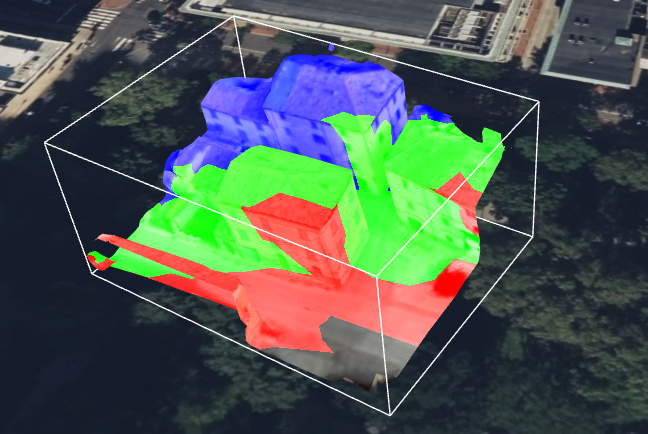
You can probably imagine that by assigning different feature IDs to (smaller) areas of the mesh, you could highlight/identify specific regions of the mesh.
But again: This is only for illustrating one possible approach. Nothing of that is supported with robust toolchains until now. And maybe, depending on your exact requirements, a feature ID texture could be better suited than a feature ID attribute, even though generating that might raise additional questions (particularly when LODs are involved).
After all these disclaimers, here’s the example:
Cesium Forum 42970 example.zip (48.7 KB)