Hi,
Is there a way to seamlessly combine a Cesium terrain model with Google 3D Tiles in CesiumJS?
I’m looking for a solution to visualize CZML road tracks over and/or under bridges.
Question:
Is there a way to select a specific draping model—like Cesium World Terrain or Google 3D Tiles—for individual line segments of the track?
For example:
-
For the track segments that go over a bridge/overpass, use Google 3D Tiles for the draping surface.
-
For the track segments that go under a bridge/underpass, use the Cesium World Terrain for the draping surface.
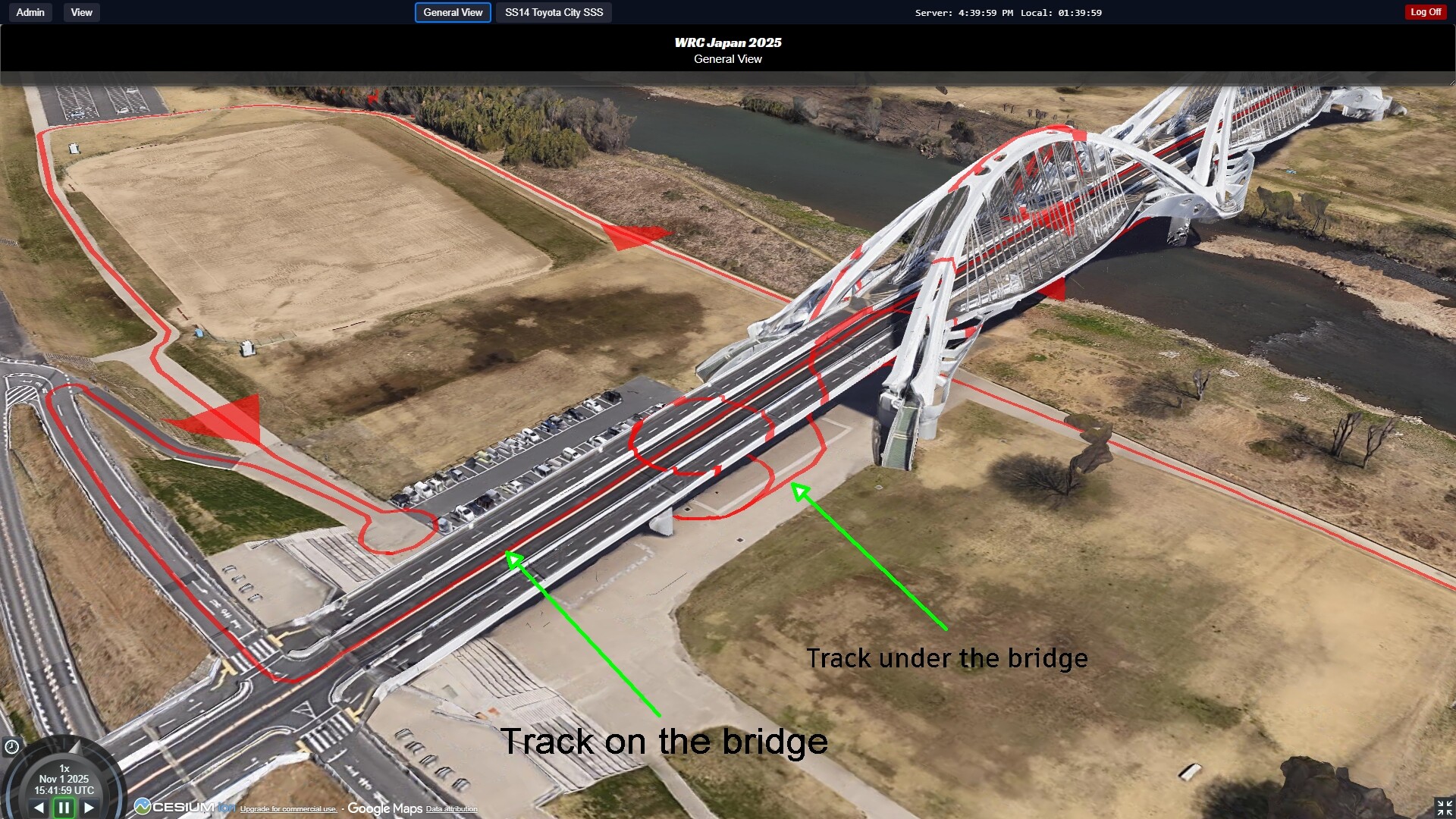
Current situation: Double drape lines since both models are active
Of course, the goal is for one model to exclude the other at any given location to avoid displaying double lines in the 3D map view.
I am specifically referring to the 3D visualization of 2D tracks that were digitized from orthophotos or satellite imagery.
I’m just starting to evaluate Google 3D Tiles in Cesium. It looks promising, but so far, I’ve only been able to use it as a nice 3D background in certain cases.
Would a true 3D track be a better solution, even though that would introduce new problems, such as the need for actual travel to locations to record the 3D data?

This is how it should be (photoshopped image)
Thanks in advance,
Davor