Hello @janine ,
Thanks for the explanation and code. You won’t believe it, but it still does not work on my end for some reason. The code does compile, but literally nothing has changed. For the purpose of completeness, I will share my entire .h and .cpp code, just to be sure (with your code included of course). Be aware that I made some changes to the naming (PlaneTrack = RouteTrack for example). I have some other additions to the code, which should not affect this part of the code but I’m showing it here just to be sure.
RouteTrack.h
// Fill out your copyright notice in the Description page of Project Settings.
#pragma once
#include "CoreMinimal.h"
#include "GameFramework/Actor.h"
#include "Components/SplineComponent.h"
#include "CesiumRuntime/Public/Cesium3DTileset.h"
#include "CesiumRuntime/Public/CesiumGeoreference.h"
#include "Engine/DataTable.h"
#include <glm/vec3.hpp>
#include "CesiumGeospatial/Ellipsoid.h"
#include "CesiumGeospatial/Cartographic.h"
#include "RouteTrack.generated.h"
USTRUCT(BlueprintType)
struct FAircraftRawData : public FTableRowBase
{
GENERATED_USTRUCT_BODY()
public:
FAircraftRawData()
: TimestampRaw("")
, Latitude(0.0)
, Longitude(0.0)
, Altitude(0.0)
, Velocity(0)
, Heading(0)
, Pitch(0)
, Roll(0)
{
}
UPROPERTY(EditAnywhere, Category = "FlightTracker")
FString TimestampRaw;
UPROPERTY(EditAnywhere, Category = "FlightTracker")
double Latitude;
UPROPERTY(EditAnywhere, Category = "FlightTracker")
double Longitude;
UPROPERTY(EditAnywhere, Category = "FlightTracker")
double Altitude;
UPROPERTY(EditAnywhere, Category = "FlightTracker")
int Velocity;
UPROPERTY(EditAnywhere, Category = "FlightTracker")
int Heading;
UPROPERTY(EditAnywhere, Category = "FlightTracker")
int Pitch;
UPROPERTY(EditAnywhere, Category = "FlightTracker")
int Roll;
};
UCLASS()
class FLIGHTTRACKER_API ARouteTrack : public AActor
{
GENERATED_BODY()
public:
// Sets default values for this actor's properties
ARouteTrack();
protected:
// Called when the game starts or when spawned
virtual void BeginPlay() override;
public:
// Called every frame
virtual void Tick(float DeltaTime) override;
public:
// Spline variable to represent the plane track
UPROPERTY(BlueprintReadOnly, Category = "FlightTracker")
USplineComponent* SplineTrack;
// Cesium class that contain many useful coordinate conversion functions
UPROPERTY(EditAnywhere, Category = "FlightTracker")
ACesiumGeoreference* CesiumGeoreference;
// An Unreal Engine data table to store the raw flight data
UPROPERTY(EditAnywhere, Category = "FlightTracker")
UDataTable* AircraftRawDataTable;
UPROPERTY(EditAnywhere, Category = "FlightTracker")
ACesium3DTileset* CesiumTileset;
	UFUNCTION(BlueprintCallable, Category = "FlightTracker")
	void SnapToTerrain();
public:
// Function to parse the data table and create the spline track
UFUNCTION(BlueprintCallable, Category = "FlightTracker")
void LoadSplineTrackPoints();
UFUNCTION(BlueprintCallable, Category = "FlightTracker")
void GetTimestampAndRotByIndex(int32 Index, FString& OutTimestamp, float& OutHeading, float& OutAltitude, float& OutVelocity, float& OutPitch, float& OutRoll);
UFUNCTION(BlueprintCallable, Category = "FlightTracker")
void GetDataAtSliderPosition(float SliderValue, FString& OutTimestamp, FVector& OutPosition, float& OutHeading, float& OutVelocity, float& OutPitch, float& OutRoll);
UPROPERTY(BlueprintReadOnly, Category = "Flight Data")
int32 TotalRowCount = 0;
};
RouteTrack.cpp (Height = Altitude, also in the CSV).
// Fill out your copyright notice in the Description page of Project Settings.


#include "RouteTrack.h"

// Sets default values
ARouteTrack::ARouteTrack()
{
 	// Set this actor to call Tick() every frame.  You can turn this off to improve performance if you don't need it.
	PrimaryActorTick.bCanEverTick = true;

	// Initialize the track
	SplineTrack = CreateDefaultSubobject<USplineComponent>(TEXT("SplineTrack"));
	// This lets us visualize the spline in Play mode
	SplineTrack->SetDrawDebug(true);
	// Set the color of the spline
	SplineTrack->SetUnselectedSplineSegmentColor(FLinearColor(1.f, 0.f, 0.f));

}

// Called when the game starts or when spawned
void ARouteTrack::BeginPlay()
{
	Super::BeginPlay();

}

// Called every frame
void ARouteTrack::Tick(float DeltaTime)
{
	Super::Tick(DeltaTime);
    // Update the slider automatically

}

void ARouteTrack::LoadSplineTrackPoints()
{
    if (this->AircraftRawDataTable != nullptr && this->CesiumGeoreference != nullptr)
    {
        TotalRowCount = AircraftRawDataTable->GetRowMap().Num();

        int32 PointIndex = 0;
        for (auto& row : this->AircraftRawDataTable->GetRowMap())
        {
            FAircraftRawData* Point = (FAircraftRawData*)row.Value;
            // Get row data point in lat/long/alt and transform it into UE4 points
            double PointLatitude = Point->Latitude;
            double PointLongitude = Point->Longitude;
            double PointAltitude = Point->Altitude;

            // Compute the position in UE coordinates
            FVector UECoords = this->CesiumGeoreference->TransformLongitudeLatitudeHeightPositionToUnreal(FVector(PointLongitude, PointLatitude, PointAltitude));
            FVector SplinePointPosition = FVector(UECoords.X, UECoords.Y, UECoords.Z);
            this->SplineTrack->AddSplinePointAtIndex(SplinePointPosition, PointIndex, ESplineCoordinateSpace::World, false);

            // Get the up vector at the position to orient the aircraft
            const CesiumGeospatial::Ellipsoid& Ellipsoid = CesiumGeospatial::Ellipsoid::WGS84;
            glm::dvec3 upVector = Ellipsoid.geodeticSurfaceNormal(CesiumGeospatial::Cartographic(FMath::DegreesToRadians(PointLongitude), FMath::DegreesToRadians(PointLatitude), FMath::DegreesToRadians(PointAltitude)));

            // Compute the up vector at each point to correctly orient the plane
            glm::dvec4 ecefUp(upVector, 0.0);
            const GeoTransforms& geoTransforms = this->CesiumGeoreference->GetGeoTransforms();
            const glm::dmat4& ecefToUnreal = geoTransforms.GetEllipsoidCenteredToAbsoluteUnrealWorldTransform();
            glm::dvec4 unrealUp = ecefToUnreal * ecefUp;
            this->SplineTrack->SetUpVectorAtSplinePoint(PointIndex, FVector(unrealUp.x, unrealUp.y, unrealUp.z), ESplineCoordinateSpace::World, false);

            PointIndex++;
        }
        this->SplineTrack->UpdateSpline();
    }
}

void ARouteTrack::SnapToTerrain() {
    if (this->CesiumTileset) {
        TArray<FVector> SamplePoints;
        for (auto& row : this->AircraftRawDataTable->GetRowMap())
        {
            FAircraftRawData* Point = (FAircraftRawData*)row.Value;
            // Get row data point in lat/long/alt and transform it into Unreal points
            double PointLatitude = Point->Latitude;
            double PointLongitude = Point->Longitude;
            double PointHeight = Point->Altitude;
            SamplePoints.Add({ PointLongitude, PointLatitude, PointHeight });
        }

        this->CesiumTileset->SampleHeightMostDetailed(SamplePoints, FCesiumSampleHeightMostDetailedCallback::CreateLambda(
            [this](ACesium3DTileset* Tileset, const TArray<FCesiumSampleHeightResult>& Results, const TArray<FString>& Warnings) {
                this->SplineTrack->ClearSplinePoints();

                for (int32 PointIndex = 0; PointIndex < Results.Num(); PointIndex++) {
                    FVector Result = Results[PointIndex].LongitudeLatitudeHeight;
                    // Compute the position in UE coordinates
                    FVector SplinePointPosition = this->CesiumGeoreference->TransformLongitudeLatitudeHeightPositionToUnreal(Result);
                    this->SplineTrack->AddSplinePointAtIndex(SplinePointPosition, PointIndex, ESplineCoordinateSpace::World, false);

                    // Get the up vector at the position to orient the aircraft
                    const CesiumGeospatial::Ellipsoid& Ellipsoid = CesiumGeospatial::Ellipsoid::WGS84;
                    glm::dvec3 upVector = Ellipsoid.geodeticSurfaceNormal(CesiumGeospatial::Cartographic(FMath::DegreesToRadians(Result.X), FMath::DegreesToRadians(Result.Y), FMath::DegreesToRadians(Result.Z)));

                    // Compute the up vector at each point to correctly orient the plane
                    FVector4 ecefUp(upVector.x, upVector.y, upVector.z, 0.0);
                    FMatrix ecefToUnreal = this->CesiumGeoreference->ComputeEarthCenteredEarthFixedToUnrealTransformation();
                    FVector4 unrealUp = ecefToUnreal.TransformFVector4(ecefUp);
                    this->SplineTrack->SetUpVectorAtSplinePoint(PointIndex, FVector(unrealUp), ESplineCoordinateSpace::World, false);
                }

                this->SplineTrack->UpdateSpline();
            }));
    }
}

void ARouteTrack::GetTimestampAndRotByIndex(int32 Index, FString& OutTimestamp, float& OutHeading, float& OutAltitude, float& OutVelocity, float& OutPitch, float& OutRoll)
{
    OutTimestamp = TEXT("");
    OutHeading = 0;
    OutAltitude = 0;
    OutPitch = 0;
    OutRoll = 0;

    if (!this->AircraftRawDataTable) return;

    const TMap<FName, uint8*>& RowMap = this->AircraftRawDataTable->GetRowMap();
    if (Index < 0 || Index >= RowMap.Num()) return;

    int32 CurrentIndex = 0;
    for (const TPair<FName, uint8*>& Row : RowMap)
    {
        if (CurrentIndex == Index)
        {
            FAircraftRawData* RowData = (FAircraftRawData*)Row.Value;
            OutTimestamp = RowData->TimestampRaw;
            OutHeading = RowData->Heading;
            OutAltitude = RowData->Altitude;
            OutVelocity = RowData->Velocity;
            OutPitch = RowData->Pitch;
            OutRoll = RowData->Roll;
            return;
        }

        ++CurrentIndex;


        // <-- Slider-controlled increment
    }
}
void ARouteTrack::GetDataAtSliderPosition(float SliderValue, FString& OutTimestamp, FVector& OutPosition, float& OutHeading, float& OutVelocity, float& OutPitch, float& OutRoll)
{
    OutTimestamp = TEXT("");
    OutHeading = 0.f;
    OutVelocity = 0.f;
    OutPitch = 0.f;
    OutRoll = 0.f;
    OutPosition = FVector::ZeroVector;

    if (!AircraftRawDataTable || SliderValue < 0.f || SliderValue > 1.f) return;

    // Get row map and total number of rows
    const TMap<FName, uint8*>& RowMap = AircraftRawDataTable->GetRowMap();
    int32 NumRows = RowMap.Num();
    if (NumRows == 0) return;

    // Clamp slider just in case
    SliderValue = FMath::Clamp(SliderValue, 0.f, 1.f);

    // Map slider to an index
    float FloatIndex = SliderValue * (NumRows - 1);
    int32 IndexA = FMath::FloorToInt(FloatIndex);
    int32 IndexB = FMath::Min(IndexA + 1, NumRows - 1);
    float Alpha = FloatIndex - IndexA; // interpolation factor

    // Fetch data from both rows
    TArray<FAircraftRawData*> SortedRows;
    SortedRows.Reserve(NumRows);
    for (const TPair<FName, uint8*>& Row : RowMap)
    {
        SortedRows.Add((FAircraftRawData*)Row.Value);
    }

    // DataTable rows are not guaranteed to be in CSV order unless sorted
    // Optional: sort by timestamp if necessary
    SortedRows.Sort([](const FAircraftRawData& A, const FAircraftRawData& B) {
        return A.TimestampRaw < B.TimestampRaw;
        });

    FAircraftRawData* DataA = SortedRows[IndexA];
    FAircraftRawData* DataB = SortedRows[IndexB];

    // Interpolate lat/lon/alt to Unreal position
    FVector PosA = CesiumGeoreference->TransformLongitudeLatitudeHeightPositionToUnreal(FVector(DataA->Longitude, DataA->Latitude, DataA->Altitude));
    FVector PosB = CesiumGeoreference->TransformLongitudeLatitudeHeightPositionToUnreal(FVector(DataB->Longitude, DataB->Latitude, DataB->Altitude));
    OutPosition = FMath::Lerp(PosA, PosB, Alpha);

    // Interpolate other values
    OutHeading = FMath::Lerp(DataA->Heading, DataB->Heading, Alpha);
    OutVelocity = FMath::Lerp(DataA->Velocity, DataB->Velocity, Alpha);
    OutPitch = FMath::Lerp(DataA->Pitch, DataB->Pitch, Alpha);
    OutRoll = FMath::Lerp(DataA->Roll, DataB->Roll, Alpha);

    // Output timestamp (you can interpolate if needed, but strings are usually discrete)
    OutTimestamp = (Alpha < 0.5f) ? DataA->TimestampRaw : DataB->TimestampRaw;
}
.buid.cs
// Copyright Epic Games, Inc. All Rights Reserved.

using UnrealBuildTool;

public class FlightTracker : ModuleRules
{
	public FlightTracker(ReadOnlyTargetRules Target) : base(Target)
	{
		PCHUsage = PCHUsageMode.UseExplicitOrSharedPCHs;

		PublicDependencyModuleNames.AddRange(new string[] { "Core", "CoreUObject", "Engine", "InputCore", "EnhancedInput", "CesiumRuntime" });

        // Tell Unreal Engine to use C++17
        CppStandard = CppStandardVersion.Cpp20;

        // Uncomment if you are using Slate UI
        // PrivateDependencyModuleNames.AddRange(new string[] { "Slate", "SlateCore" });

        // Uncomment if you are using online features
        // PrivateDependencyModuleNames.Add("OnlineSubsystem");

        // To include OnlineSubsystemSteam, add it to the plugins section in your uproject file with the Enabled attribute set to true
    }
}
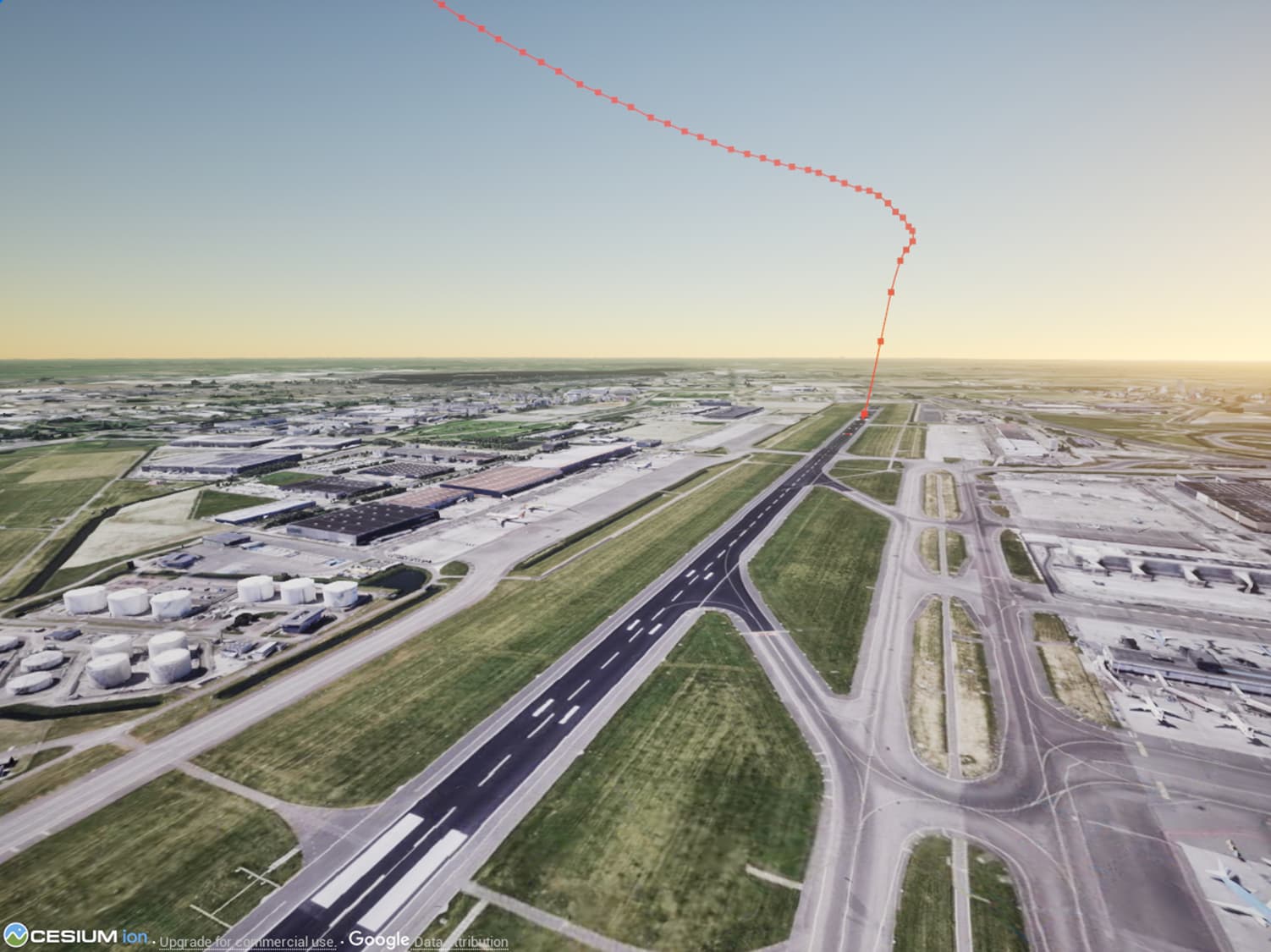
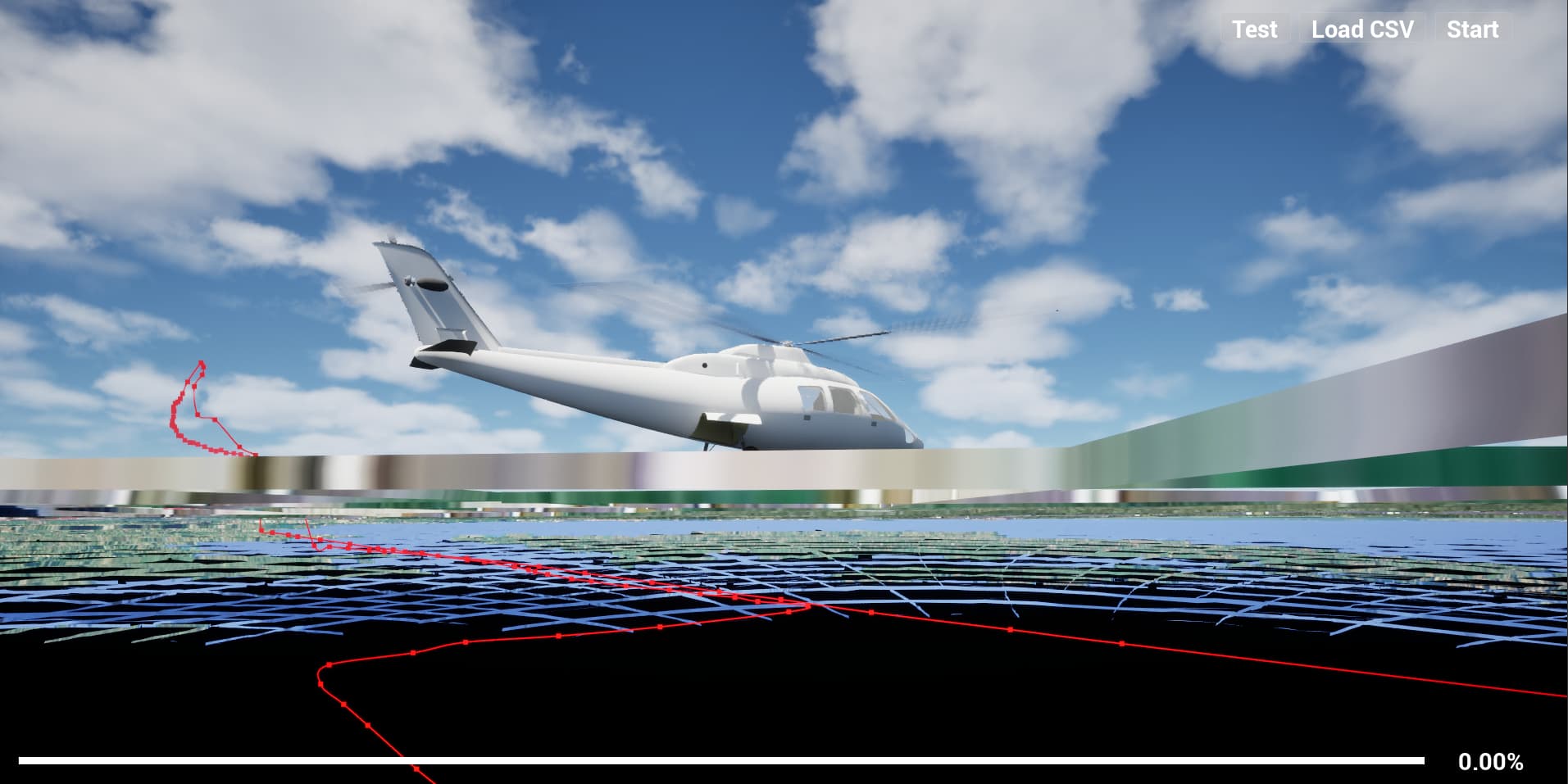
The result in Unreal Engine:
Am I missing something here?


 Everything you shared makes sense to me, so I have no idea what could be going wrong. Maybe try these things?