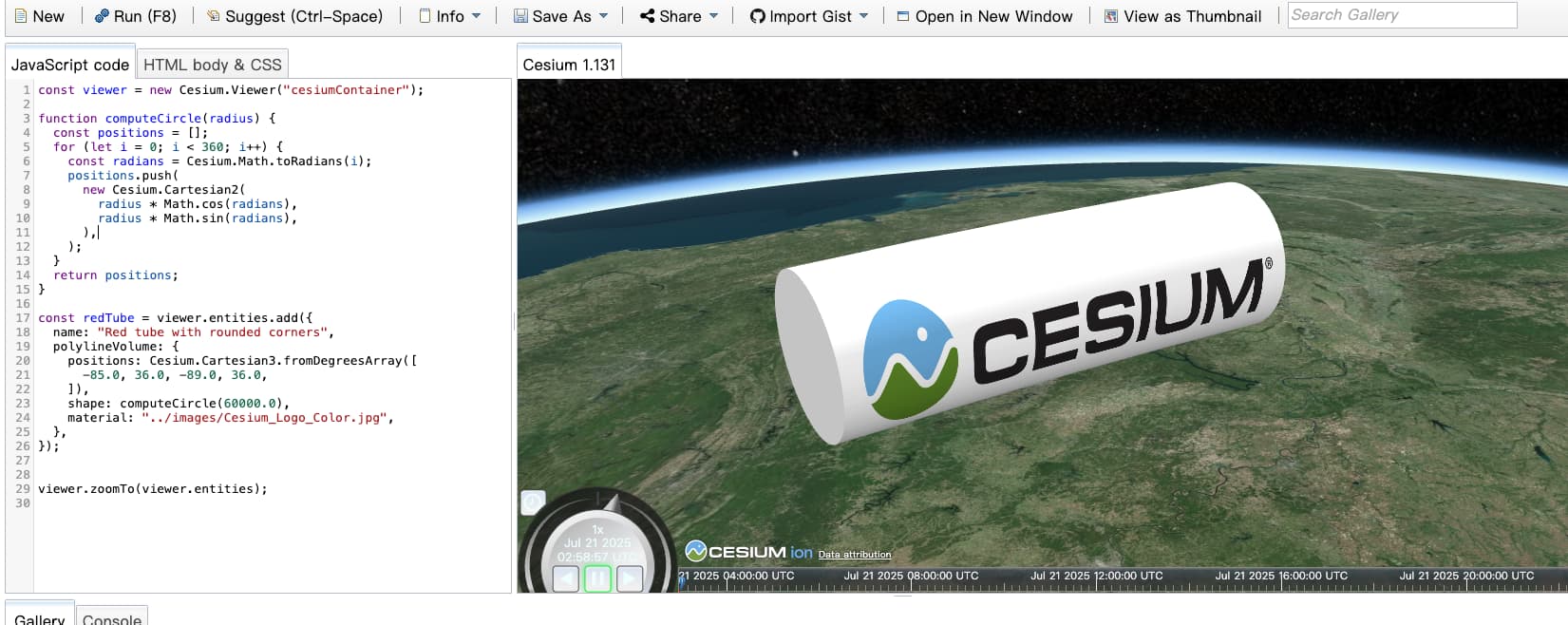
Polyline volume use image material, but the image overturn on the back side


  • My aim is for this picture material to wrap around the surface
    the code is :
    const viewer = new Cesium.Viewer(“cesiumContainer”);

function computeCircle(radius) {
const positions = ;
for (let i = 0; i < 360; i++) {
const radians = Cesium.Math.toRadians(i);
positions.push(
new Cesium.Cartesian2(
radius * Math.cos(radians),
radius * Math.sin(radians),
),
);
}
return positions;
}

const redTube = viewer.entities.add({
name: “Red tube with rounded corners”,
polylineVolume: {
positions: Cesium.Cartesian3.fromDegreesArray([
-85.0, 36.0, -89.0, 36.0,
]),
shape: computeCircle(60000.0),
material: “../images/Cesium_Logo_Color.jpg”,
},
});

viewer.zoomTo(viewer.entities);

Hi @yydy1991, welcome to the community!

This is an interesting problem, and I don’t know of a simple way to solve it using PolylineVolumeGraphics. I tried generating two overlapping shapes, one for each side of the volume, but the seams between the two shapes are still visible. See this Sandcastle example.

If the overlapping shapes don’t work for you, could you generate a glTF file with your desired geometry? This would give you a lot more control over the texture mapping.

Thank you very much, this solution can temporarily solve my problem.

I tried to edit fabric.source yesterday, however, due to my lack of knowledge, I was unable to achieve a satisfactory result.