There are again 17 days and I just get no support here.
What is that for a forum?
Is this forum only from a man team?
I ask for answers to at least why in the repository 3 directories in the “dist” folder is copied separately.
There are again 17 days and I just get no support here.
What is that for a forum?
Is this forum only from a man team?
I ask for answers to at least why in the repository 3 directories in the “dist” folder is copied separately.
Hey there,
I’m not a Cesium person, so I’ll talk for myself, but this forum is about the Cesium API and JS engine. Your issues aren’t really about that, you’ve got more development issues in general. This is not the place for PHP, JS or even TS, not CSS nor HTML. So this is probably why you’re not getting too much interaction for your issues; they’re not Cesium specific.
Cheers,
Alex
Hi Alex,
Thanks for the answer. My main questions went to the repository proposed here. There, some directories were simply copied over anyway and I do not know why and what?!
The other question with the PHP etc. was more of a secondary question, whether and to what extent they can be linked to the most common web programming language in the world. Finally, a software called “cesium” is developed and these would have to be usable the most common, widespread programming language. But that will nowhere described. Even with the “WebPack” usage is not reasonable and extensively explained somewhere. Thanks to @sam.rothstein and @Marco13 I headed ahead and could first start “cesium”. I will not even answer the normal “cesium” questions here.
For example, here with the example here:
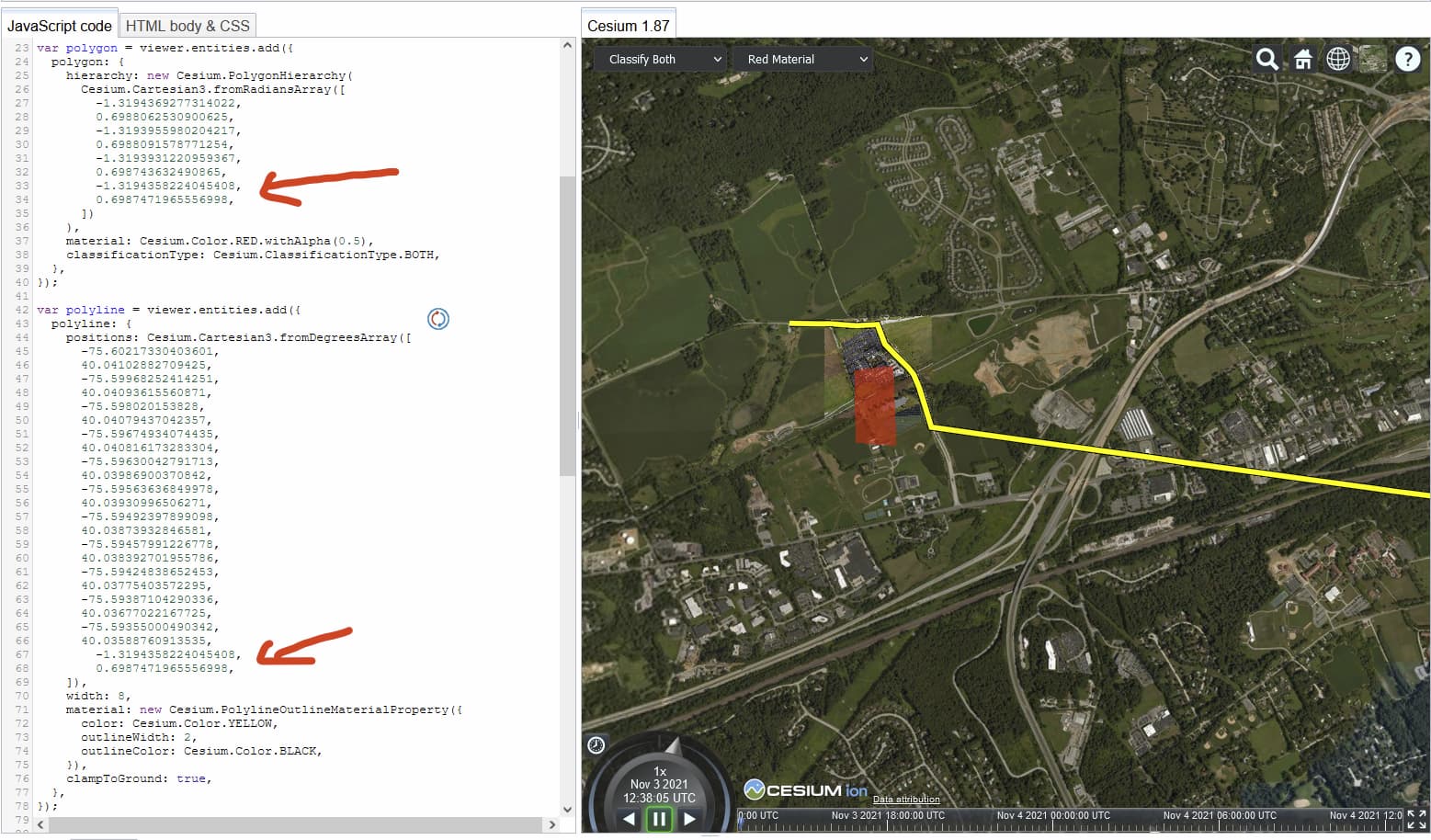
If a red rectangle is drawn on the card, with the help of “polygon and coordinates” but I do not understand how these coordinates came from or as I could remove the coordinates from a foreign map and integrate here in my cesium code. The red rectangle has 4 corners and when I look at the coordinates in the 1st polygon, there are a total of 8 coordinates. Since the coordinate points (Lat. and Lon) exist, I can still understand it. But in the 2nd polygon 22 are coordinates.
Similar to what Alexander said: It’s not clear for me whether the overarching question is about general interoperability between JavaScript and PHP, or interoperability between PHP and Cesium in particular. Different environments and different applications use different tech stacks and different languages, and combining two of them always bears challenges.
Don’t get me wrong: I agree that the learning curve is far too steep in modern web development, and it comes with a complexity that should better be hidden from those who only want to develop an end-user-facing application. That’s a general problem, and not one that Cesium alone can solve.
But Cesium has addressed this problem (IMHO better than many other companies) insofar that there is extensive documentation on the level of API documentation and tutorials, “Getting started” projects like the ones that Sam linked to, and support here in the forum. (At least, for questions that are specific to Cesium products - and to a lesser extent for the questions about how to combine JavaScript- and PHP-based tech stacks in general). And finally, the Sandcastle provides dozens of code snippets that allow you to interactively explore what is possible with CesiumJS.
Talking about the Sandcastle, and referring to your example:
As shown in the screenshot below, that other polygon (it is rather a polyline) shows the shape of a road, as a thick yellow line with a black outline:
You can also edit the coordinates in this array, hit “Run”, and observe the effect.
Hi Marco,
Thanks for the answer.
Well, that with the PHP I understood. Although this question was a secondary question and the actual main questions were allowed to be unanswered by the secondary questions, please forget all this question with the PHP.
On my main question still has not been answered.
Therefore, I ask the question again and ask for an answer.
Why is the 3 directories (workers, assets and widgets) complete in the repository in the “WebPack” of “node_modules” in the “dist” folder? Is not it easy there when importing the sides package in the JS file?
If this is nowhere documented, I can not understand the meaning. Therefore, I am forced to ask the question here. Therefore, I ask for this explicit to answer. Because I have already asked this question several times.
Ah okay, thanks for the hint. That this 2nd polygon refers to the street line I have only understood.
But in addition to the street line, a total of 2 rectangles are watching. One is in red and the other transparent. When the 1st polygon forms the red rectangle, where are the coordinates for the transparent rectangle?
How can I create the coordinates when I want to make a rectangle on the map (where other), as such as the red rectangle?
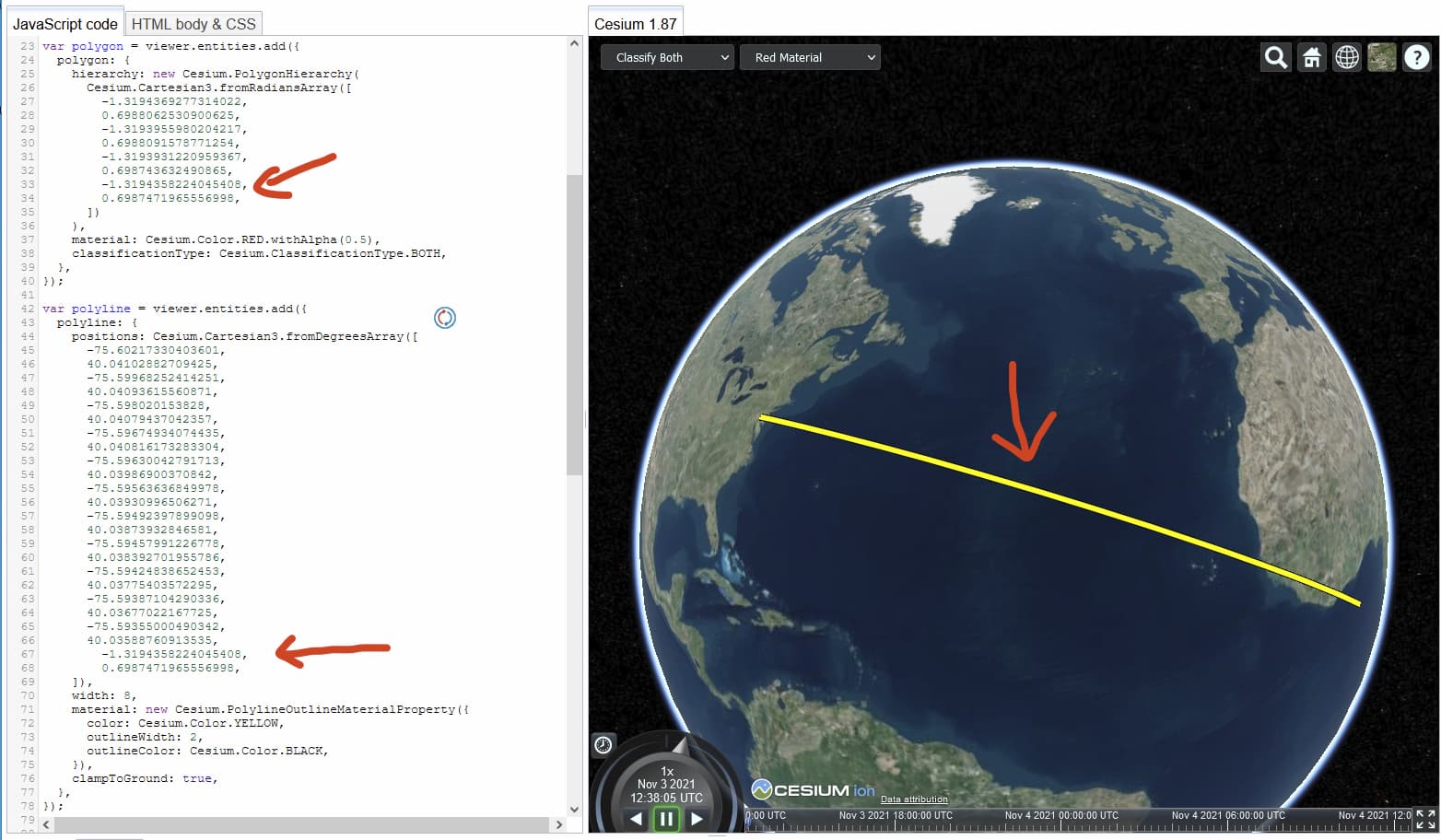
I copied the last 2 coordinates from the red rectangle (since I did not know where I can take the coordinates) and added at the end of the polyline. Since I thought, okay, it should lead the line to the red rectangle edge. I deceived. See the marked coordinates with the arrow and the street line in the screen.
The street line has landed somewhere in Africa. Is very funny?
I don’t know much about WebPack. So I’m not sure whether the following will be helpful for you in any way. But I’ll try:
Webpack is a tool for “bundling” Web Applications. It takes JavaScript code, HTML, and resources like images (PNG files etc.), and combines them into a “bundle”. This bundle can be uploaded to a webserver. Then, clients can use this Web Application. The “bundle” that is created needs a certain directory layout. And the directory where this “bundle” is created is the dist directory.
The example project that Sam has created is intended for people who already use WebPack, and who want to use Cesium with WebPack. In this example project, WebPack is used to create the “bundle” with everything that you need in order to run a Cesium WebApplication, and puts that into the dist folder.
An aside: It is neither the goal of this project, nor the responsibility of the creator, to explain or document “how WebPack works”. If I had the task to create a Cesium project with WebPack, then I would first spend a few weeks with reading the the WebPack documentation. And then, I’d happily use the project that Sam provided, as a starting point for setting up my actual project. The work that Sam invested into this example project would then save me a lot of time (and a lot of trial-and-error).
But instead of WebPack, someone could use Gulp, or Babel, or Grunt, or some other tool. And with these tools … everything is different. That’s part of the complexity of Web Applications that I mentioned earlier. It should not be so complicated and heterogeneous. But it is, unfortunately.
Providing similar starter projects for each and every tool, or providing low-level support for someone who is trying to set up an application with a certain tech stack, is not realistically possible.
Back to the part that is actually related to CesiumJS:
Well… for the rectangle, the coordinates are given in radians, and the geometry is created using fromRadiansArray. For the street-polyline, the coordinates are given in degrees, and the geometry is created using fromDegreesArray .
If you want to let the line end at the corner of the rectangle, you could, for example, convert the radians to degrees, as shown in this image:
Hi Marco,
yes that’s right so far. The Webpack JS files etc. bundles I know. But if the JS files are always bundled why the lists referred 3 is also separately in the “dist” directory copied? The “Cesium” package was still bundled in a JS file. As this confuses me I wanted to know exactly why these additional copies must be. The logic behind it I could not understand.
I’m already dealing with WebPack documentation for over a month. That with the webpack I have already helped a lot. But the web pack documentation can not explain to me why the repository copies the 3 directories to the “dist” folder, although the entire package of “cesium” is already bundled. The procedure as cesium with web pack is done and can only be answered by sides itself and can not be documented by WebPack. Finally, an initial description in the cesium documentation via WebPack is available, but unfortunately very gaps and faulty. Maybe it’s because this documentation is very outdated and is not compatible with WebPack 5. I dont know. Therefore, I thought that I could get help here in the forum.
Yes, with Gulp I had already tried until @sam.rothstein I had provided the repository here. Since then I use webpack. Because with Gulp countless mistakes and sides came not properly.
Wow, really awesome. Slowly I understand that with the coordinates. So there are 2 different types of coordinates? One comes with degrees and the other with radians.
My real goal is that I draw on the map a rectangle and save the coordinates into a MySQL DB but I would have to find the coordinates of 4 or more corners when drawing. After storing it in the DB is very easy. But later, if I then click on the map on the drawn rectangle that the properties of this object will be displayed as a list next door or as a popup.
Is there a way to draw the mouse on the map a rectangle where I can take the coordinates of the corners?
I’m not so familiar with all the Web development tools, or WebPack in particular. But regarding this question:
If I understood this correctly, then it could be phrased like that: Why are these directories checked in into the GitHub structure, although they should be created automatically when running WebPack? (Similar to the question of why the repository contains the node_modules directory, although it should be created automatically when running npm install). If this is the core of the question, I have to say: I don’t know. Maybe it was an attempt by Sam to make things a bit simpler. To basically have a state in the repository that can be used directly after cloning. But that’s a guess (and might not work in all cases).
There are many different types of coordinates. In this case, both coordinates are cartographic coordinates, though: In both cases, the coordinates are given by Latitude and Longitude.
(The difference between degrees and radians is a very low-level, mathematical difference. It’s often a source of confusion, because you sometimes don’t know whether coordinates are given or expected in degrees or radians. But this confusion can, to some extent, be avoided, by proper names. Like goToPositionRad(latitudeInRadians, longitudeInRadians), and of course, proper documentation, like @param latitudeInRadians The latitude IN RADIANS! and so on).
Besides cartographic coordinates, there are also cartesian coordinates (where the unit is also a source of confusion - these could be coordinates like (x,y), where the values could be in meters or centimeters or whatnot…).
And on top of the cartesian and cartographic coordinates, there are infinitely many possible coordinate systems. It’s complicated.
Is there a way to draw the mouse on the map a rectangle where I can take the coordinates of the corners?
I’m not a CesiumJS expert. But usually, the Sandcastles contain demos/snippets for many common tasks. The following allows you to draw polygons on the surface, which might be close to what you want, or at least contain some building blocks that could help to achieve your goal:
Hi,
something strange happened.
Although I use the repo from @sam.rothstein 1: 1, the map cannot load properly in the browser. The map is constantly zooming in and the icons are missing in the menu.
I tried to use an older version of Cesium. So from 1.88.0 to 1.84.0 I went down but the problem is always there.
Can someone tell me what happened here?
I also renewed my access token several times because I thought that I might be missing the access to something.
I ask for your urgent assistance.
Cannot use the card at all.
Kind regards
Can someone here help me please?
It sucks that I haven’t even been able to start anything here for months.
The documentaries are sketchy and extremely shitty …
I’m going crazy and slowly going crazy … isn’t there anyone here who takes the time to help me?


Because, frankly - and I mean no disrespect here, but - 1. the Cesium API is fairly complex so many things can be the issue, but more to the point 2. you’re having a lot of beginner issues that can be baffling to grok. Why a worker.js file contains HTML is in itself bonkers, but also fairly obviously wrong. How that could have happened is multi-factored. I downloaded the repo and did not have any issues, so it might be even your own computer environment. I wouldn’t even know where to start with that.
The solution very often is to delete it, and start from scratch. Or at least in thiese cases, remove all the node stuff, and reinstall those with npm. Is it Windows, Linux or Mac? Are there issues with that? Could it be some other dependancy rather than Cesium? And so on.
Now, I’m sorry you’re not getting much traction on this, but please understand that your issue is more complicated than simply saying “do X” and off we go. Who knows what your problem is? Some times you have an issue, some times it gets resolved, some times you come back with more, it’s very hard to keep track of where you are in your line of development. Do you have issues with other things on this computer? Is it up to date with everything? Even the quickstart repo, is it up to date with everything? Is Node modules local or global? Which version of node is installed? Which version of js? And so on.
Most of these questions are just waaaaay out of scope for the Cesium API itself, even if they’ve (Cesium) made a helpful quickstart repo. You should imagine that others aren’t struggling so much with the repo, otherwise there’d be a lot more talk here in the forums about it. So, maybe something is amiss with your environment? Have you exhausted all avenues locally? How did the worker get overwritten with HTML? It’s very odd.
Cheers,
Alex
It looks like you somehow uploaded all this to a website (at least, the screenshots do not refer to localhost). Depending on where this is hosted, the js files may erroneously be returned with the HTML content type. As a quick check: Go to the “Network” tab, filter to search for “cesiumWorkerBootstrapper.js”, select the corresponding request, and look at the “Response Headers: Content-Type”.
(That’s a wild guess for now. With nothing more than a rant and some screenshots, it’s hard to give focussed advice…)
Hi @Alexander_Johannesen and @Marco13,
thank you both for the answers.
I’ll summarize the two of you in one message.
Sure, I understand that the Cesium API is very complex and not everything is easy to use.
But yes, I really have a lot of beginner problems, which is what it was said about here in the thread from the start. The documentation is very sketchy and at the same time flawed. But I have already said that here several times. Therefore, this is not about the documentation of Cesium, but rather about the actual problem in terms of functionality.
The newly downloaded repo itself works for me too. The problem is, if you want to adjust the paths from the “dist” directory, the problem comes like in the screenshots that I posted a few days ago. The repo is also completely stupid. I ask myself who actually uses such a structure in productive use?
Most, or rather 90% of the time, the structure of a web project consists of creating a “public” directory instead of a “dist”. The directories “css/, js/, img/ etc.” are then included. So that one saves JS files for example in “public/js/” and not in the root directory of the “dist” folder. That is nonsense. For this reason I try to adjust the folder structure correctly.
If I change 3-4 things in the config file, the whole thing works fine. Until then suddenly nothing works anymore with a voluntary change. So the problem as you can see in the screenshots arises. If I undo that, it still doesn’t work. If I also undo the 3-4 things that worked before, it still doesn’t work anymore. The whole thing sucks and building on that is really crazy.
I am using a Windows 10 computer and have installed version 14.17.3 for Node and 6.14.13 for npm.
The package.json file is exactly the same as in the repo.
I start the whole thing on “http: // localhost: 8080” because I use the “webpack-dev-server” … so when you output “npm start” in the console.
Yes, I have exhausted all options. I’ve been sitting on it for several months now and haven’t made any progress.
I can’t tell you how the worker was overwritten with HTML. Cesium developer himself has to answer that for us. Apparently there is a BUG there.
It is therefore advisable to transfer this support to Discord. No one really gets help here with forums. On the contrary, it only wastes time. Forum was used back in the 90’s, today Discord is used everywhere.
So you can help someone quickly, precisely and more effectively.
You can even use Discord to remotely look at the problem with multiple or individual people.
A Discord server is quick and very easy to create. I proposed that in August 2021 and it means that it will come soon. But 3 months have passed.
This is what all of the HTML looks like:
and so all the console bugs:
Many greetings
Daniel
The newly downloaded repo itself works for me too.
Fine.
The repo is also completely stupid.
If I change 3-4 things in the config file, the whole thing works fine. Until then suddenly nothing works anymore with a voluntary change.
So you change some things, and then something does not work? Mmmmkay.
It is therefore advisable to transfer this support to Discord.
Imagine an web development expert sitting in front of your computer, together with you. How, exactly, would that prevent the situation that you change something and then something does not work?
I understand your frustration. I also experienced that (not with CesiumJS, but with web development in general). But complaining that “something does not work after you changed something” will probably not help to reduce that frustration. Right now, you’re only sharing that frustration with others.
So there are, broadly speaking, two possible paths:
But again: All this is fairly unrelated to CesiumJS. If you wanted to set up any other web application, you’d run into the same trouble. So you’re demanding free, general DevOps/Web-Development support here.
Okay, I’ll do that and make this available to you.
I’m curious what will come of it.
Getting support via Discord is much easier and more helpful than doing it here via a forum. Since 1. it is handled just in time, 2. if necessary, the expert can view the live directly via remote and thus analyze the error better, instead of having to go to great lengths to just describe the errors to you, as is now the case.
If you look at the “Flutter” framework, over 2900 people are active there every day. There are numerous other frameworks or developer servers available on Discord. Flutter is owned by Google and that alone is a great indication that things like this that grow above your head are a better choice.
As proof, here’s a snippet of it:
Yes, I will fork the repo and share it with you.
I try to make the Git commits as understandable as possible so that you can understand that.
No, that is completely wrong. I have been a web developer for over 15 years and experience such a (sorry for the statement  measuring for the first time. It definitely has all of this to do with CesiumJS only.
Because I deal with Webpack for about a month and have adjusted the configuration so that it fits perfectly with many web applications. The Webpack-Config works without any objection and error-free for various web projects. I now add CesiumJS, then bang and the result is as shown in the screenshots above.
Before that, I had a fully functional Gulp configuration that was perfectly and flawlessly adapted for the web projects. But unfortunately this didn’t work with CesiumJS.
That’s why I switched from Gulp to Webpack and I’m back to the beginning. It was said that Webpack would be more suitable for CesiumJS, pretty much at the beginning of these threads here and also in Cesium’s websites is documented by Webpack. The other day I looked at the CesiumJS code and discovered that 90% of this was configured with GULP. Really strange but well, I will continue to do the whole thing with Webpack. It has to work somehow.
You are absolutely wrong about that. I definitely don’t ask for my private preferences to be done here for free. It’s about the gaps and general functionality of CesiumJS. If this is not supported, what is the forum and all the documentation for?
Since CesiumJS has many problems in itself, it is a cheek to let the users take on the responsibility of their own problems. It is therefore a matter of course that Cesium has to be there as soon as possible and, above all, free of charge in order to eliminate the existing problem.
We’re talking about the Cesium API being complex.
Then I ask: How long has the Cesium project been around?
In Github alone I can see that the first versions existed as early as 2012. That was almost 10 years ago, wasn’t it? Now let me ask the question again: why has the Cesium community not grown as it did in the competitions?
I’ll just answer: Many users who rediscovered Cesium went straight to the contests as they are currently facing the same problems as me and most of them are absolutely annoyed. If even the base is not working, they think “I will buy another card”.
Hi @Marco13 and everyone else too,
as promised, I reconstructed the repo forked and the senaries. I got it to the point where it stopped working.
What I have a little different from the actual repo is that I have defined an object (app) where the paths are correctly adjusted and assigned to the Webpack Config.
Here is my repo:
I ask you to analyze this and help me to find a solution.
I’m totally desperate and in the same condition as in August.
The actual structure should look like this. Which is roughly the right one:
What I also noticed are these 3 warnings, which I also do not get away. I’ve already tried it with SplitChunks, etc.
This is what happens when you do the npm run build
Please keep me up to date and give me feedback on who is looking at everything so that I can get an overview.
I thank you in advance for all the effort.
Many greetings
Daniel
I don’t see a point in arguing about Discord. The amount and type of support that you get (referring to numbers of users who are online at a given time, or whether a particular problem can be solved with a screensharing session) does not depend on whether Discord is used or not.
What does that mean?
Again: I’m not a web developer, and I don’t have a clue about these technologies. And as an aside: Even though I’m marked as ‘Cesium Team’ here, I’m not an employee of Cesium, but rather something like an external supporter, and web development with CesiumJS is not my core expertise. So this is a honest question:
What does it mean when you say that it “does not work”? There are many projects out there, live websites, that use CesiumJS. They are almost certainly not all deployed with WebPack.
It may be a wrong impression, so maybe you can point out where my thinking is wrong:
Not at this point. “The API”, at this point, consists of …
<div id="cesiumContainer"></div>
...
var viewer = new Cesium.Viewer("cesiumContainer");
The matter is “only” depolying everything to a server so that this single line of code works. (And yes, that may be complicated. That’s how it is in web development, and I think that this is not specific for CesiumJS).
I’ll try out your project later today, but since I’m not a web development expert, it’s more likely that others might be able to help you.
Hi @Marco13,
well, my criticism was directed towards the entire Cesium in general and not towards you personally.
Therefore, please do not take any of my statements personally. I very much appreciate your willingness and I am very grateful to you and everyone else who have already posted something here.
As for the Discord issue, it’s an advantage. The number of users was just to make it clear that you are more likely to grow there than how if you live in the old-fashioned way. Of course, I could write source texts with Windows 95 via Notepad, etc. or even post all of the contributions here in the forum. But that is no longer sensible and certainly no longer up-to-date. Forums were used in the 1990s and early 2000s. Today there is Discord or something like that.
The point is very simple there. You don’t have to keep writing back and forth to describe a little bug / problem. You are much more precise and effective on both sides.
It has a lot more advantages than what I have listed here.
Well, that’s not really what this thread is about. It was just a constructive criticism that Cesium can win better this way than it does now.
Back to the real problem:
I hope you can solve the problem.
Yes, I know that you are not a web developer, but at least you know more about Cesium than I do and you may be able to spot the error and point it out to me.
Oh, where are the employees, the developers at Cesium?
Why can’t the actual employees even look at the problem here or take a look?
What I mean by that is: I have a fully functional config for Gulp and now also one with Webpack. But the problem with both is that if I integrate Cesium into the config file, Cesium no longer works.
CesiumJS may run a lot of projects and live websites. But as you say yourself, not all use Webpack etc. What I wanted to clarify with this is that in the 10 years there could be many more projects with Cesium if such current problems did not exist.
Change line 102 of webpack.config.js to
CESIUM_BASE_URL: JSON.stringify('js')
(See “Configuring CESIUM_BASE_URL” in the quickstart tutorial)
Hi there, Mr. Lion (if that is your real name). A few points;
You don’t seem like you’ve got 15 years of web experience development that you claim if you can’t get the simple quickguide to work. It’s not that hard. You’ve shown us that you struggle with something (underlines and circles in screenshots, some of them clearly wrong and baffling, etc.), but very often it looks like you struggle with very basic understanding of how these complex apps are put together and the technologies used. Keep in mind that there are hundreds and possibly thousands of apps out there already working with CesiumJS (and WebPack), that should give you a hint that the problem isn’t “everything Cesium sucks”, but maybe “you” instead? A bit of humility goes a long way.
The support in this forum is excellent, provided you give clear information about what’s wrong. And so far I’ve found it really hard to follow what you’re saying, hard to understand what you’re struggling with, it’s not at all clear what you’re doing, why you’re doing it, and in what order. Your attitude towards this forum should grant you no help at all (in my opinion), slagging us off left, right and center, saying it’s all crap, nasty comments about our intentions and future projections, etc. and that in itself should be grounds for looking yourself in the mirror and take avasive action, but still …
Most people here are professionals, and we do not have the time to support you in real-time on Discord. The community is a mixture of Cesium official people and (like me) just a random dude with a Cesium-based application. Unlike you, I hate discord and the demands of everyone to deal with their issues right now! Your problem isn’t my problem; if I help you, it’s because I’m trying to be friendly and helpful. My help is given, and should need to be demanded.
As to Cesium officials, I reckon they, too, don’t feel like helping someone who is rude about either them or their product. You’re demanding free help for an open-source framework that they - in their fantastically good spirits! - have chosen to give to the world for free, including their continuing support and development work. The whole friggin’ thing is open for you to download and fix! That’s open-source right there; if it is as bad as you say (it isn’t), then fix it! Show us your skillz!
You mainly struggle with WebPack. Got nothing to do with CesiumJS. Stop thinking it does. Maybe you should spend some time learning WebPack?
Sorry to be blunt about this, but I’m really tired of your entitled negative attitude towards a whole community and technology framework, when it looks like you are struggling with your environment. Show some humility, for goodness sake! If someone has put out a framework, a repo, an example, a helpful hint, something, frankly anything, at least try to think that this might work in some other context than yours, and debug from there. Don’t assume that if it doesn’t work for you, the problem is elsewhere.
Cheers (ish),
Alex