So what i want to do, its like hide all word with a mask and only show what is inside of the border of my geojson file, in this case is Portugal . I will put a image how i like to put my output vs what its my acctual output
SandCastle CODE

import * as Cesium from "cesium";
import Sandcastle from "Sandcastle";

const viewer = new Cesium.Viewer("cesiumContainer", {
  timeline: false,
  animation: false,
  sceneModePicker: false,
  baseLayerPicker: false,
  geocoder: Cesium.IonGeocodeProviderType.GOOGLE,
  // The globe does not need to be displayed,
  // since the Photorealistic 3D Tiles include terrain
  globe: false,
});

// Enable rendering the sky
viewer.scene.skyAtmosphere.show = true;

const currentTime = Cesium.JulianDate.fromIso8601(
  "2020-01-09T23:00:39.018261982600961346Z",
);
viewer.clock.currentTime = currentTime;

// Add Photorealistic 3D Tiles
let googleTileset;
try {
  googleTileset = await Cesium.createGooglePhotorealistic3DTileset({
    // Only the Google Geocoder can be used with Google Photorealistic 3D Tiles.  Set the `geocode` property of the viewer constructor options to IonGeocodeProviderType.GOOGLE.
    onlyUsingWithGoogleGeocoder: true,
  });
  viewer.scene.primitives.add(googleTileset);
} catch (error) {
  console.log(`Error loading Photorealistic 3D Tiles tileset.
  ${error}`);
}

// Load a GeoJSON file with positions defining the project footprint
let footprint;
try {
  const resource = await Cesium.IonResource.fromAssetId(2533131);
  const dataSource = await Cesium.GeoJsonDataSource.load(resource, {
    clampToGround: true,
  });

  viewer.dataSources.add(dataSource);

  footprint = dataSource.entities.values.find((entity) =>
    Cesium.defined(entity.polygon),
  );
  footprint.polygon.outline = false;

  // Zoom to data location, and set the home view
  const cameraOffset = new Cesium.HeadingPitchRange(
    Cesium.Math.toRadians(95.0),
    Cesium.Math.toRadians(-75.0),
    800.0,
  );
  viewer.zoomTo(footprint, cameraOffset);
  viewer.homeButton.viewModel.command.beforeExecute.addEventListener((e) => {
    e.cancel = true;
    viewer.zoomTo(footprint, cameraOffset);
  });
} catch (error) {
  console.log(`Error loading geojson. ${error}`);
}

// Add a clipping region based on the loaded project footprint
const positions = footprint.polygon.hierarchy.getValue().positions;
const clippingPolygons = new Cesium.ClippingPolygonCollection({
  polygons: [
    new Cesium.ClippingPolygon({
      positions: positions,
    }),
  ],
});
googleTileset.clippingPolygons = clippingPolygons;

// Add tileset of proposed project design
let buildingTileset;
try {
  buildingTileset = await Cesium.Cesium3DTileset.fromIonAssetId(2533124);
  viewer.scene.primitives.add(buildingTileset);
} catch (error) {
  console.log(`Error loading design tileset.
  ${error}`);
}

Sandcastle.addToggleButton("Show proposed design", true, function (checked) {
  buildingTileset.show = checked;
});

Sandcastle.addToggleButton("Show footprint", true, function (checked) {
  footprint.show = checked;
});

Sandcastle.addToggleButton("Clip target location", true, function (checked) {
  clippingPolygons.enabled = checked;
});

Sandcastle.addToggleButton("Inverse clip", false, function (checked) {
  clippingPolygons.inverse = checked;
});
link for output in sandcastle Sandcastle | CesiumJS
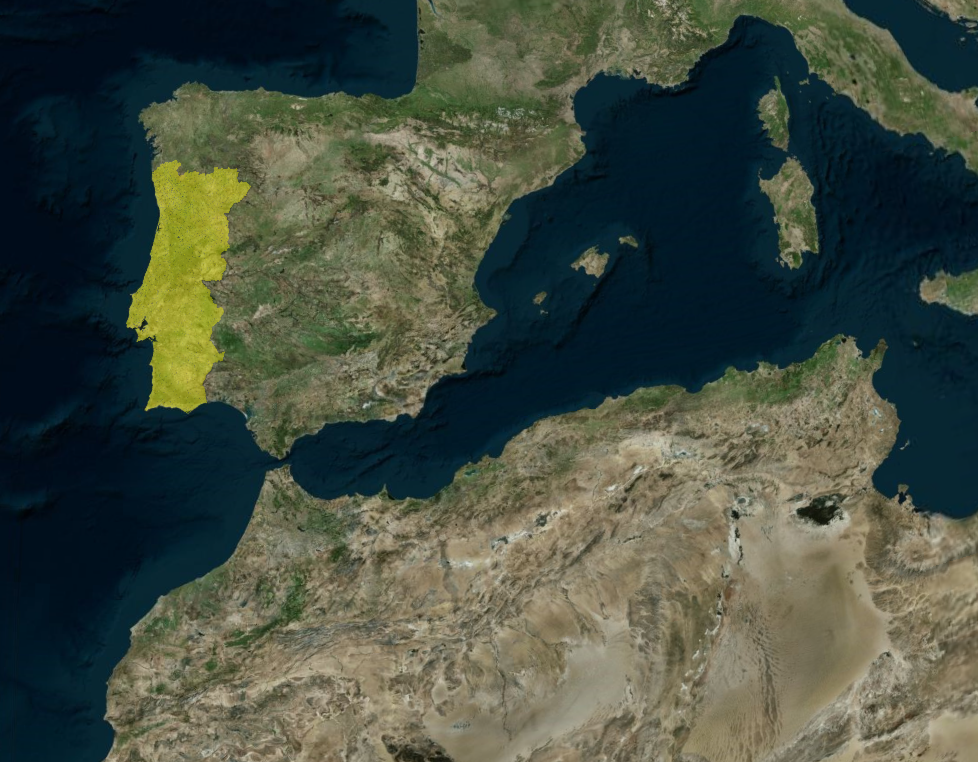
MY code

// Token
Ion.defaultAccessToken =

// Asset with my portugal geojson file
const FOOTPRINT_ID = 3944688;

async function startPortugalClippedView() {
  const viewer = new Viewer("cesiumContainer", {
    terrain: Terrain.fromWorldTerrain(),
    sceneMode: SceneMode.SCENE3D,
    timeline: false,
    animation: false,
    baseLayerPicker: true,
    geocoder: true,
    shouldAnimate: true,
  });

  // Show globe
  viewer.scene.globe.show = true;
  viewer.scene.skyAtmosphere.show = true;

  // Photorealistic 3D Tiles ---
  let googleTileset;
  try {
    googleTileset = await createGooglePhotorealistic3DTileset({
      onlyUsingWithGoogleGeocoder: true
    });
    viewer.scene.primitives.add(googleTileset);
  } catch (error) {
    console.log(`Erro ao carregar Photorealistic 3D Tiles: ${error}`);
  }

  //  footprint of Portugal ---

 let footprint;
  try {
    const resource = await IonResource.fromAssetId(FOOTPRINT_ID);
    const dataSource = await GeoJsonDataSource.load(resource, { clampToGround: true });
    viewer.dataSources.add(dataSource);

   footprint = dataSource.entities.values.find(entity => Cesium.defined(entity.polygon));
  footprint.polygon.outline = true;
  footprint.polygon.material = Color.YELLOW.withAlpha(0.3);

  const cameraOffset = new HeadingPitchRange(
    CesiumMath.toRadians(0),
    CesiumMath.toRadians(-30),
    200000.0
  );
  viewer.zoomTo(footprint, cameraOffset);
  viewer.homeButton.viewModel.command.beforeExecute.addEventListener((e) => {
    e.cancel = true;
    viewer.zoomTo(footprint, cameraOffset);
  });
  } catch (error) {
    console.log(`Erro ao carregar GeoJSON: ${error}`);
  }

  // --- Clipping Polygon to show Portugal ---

  if (footprint && googleTileset) {
    const positions = footprint.polygon.hierarchy.getValue().positions;
    const clippingPolygons = new ClippingPolygonCollection({
      polygons: [new ClippingPolygon({ positions })],
      edgeColor: Color.YELLOW,
      edgeWidth: 2.0
    });

    // Aplly inverse to only show the geojson file
    clippingPolygons.inverse = false;

    // Applly tileset
    googleTileset.clippingPolygons = clippingPolygons;
  }
}

startPortugalClippedView();
* I want to aplly the inverse clipping
Cheers , Dizz