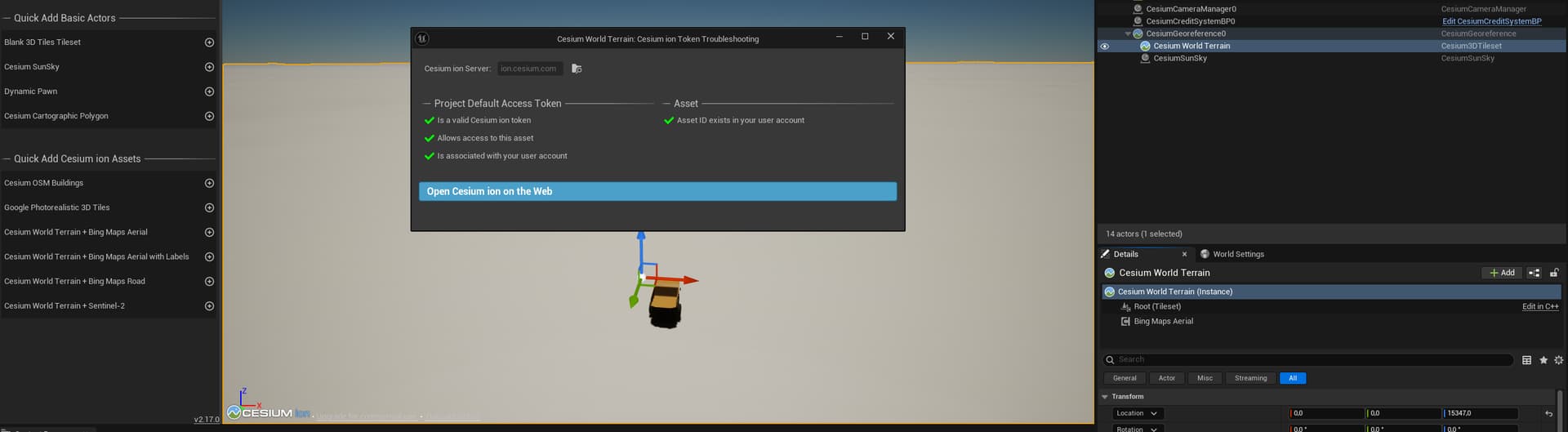
yesterday all of a sudden Cesium maps stopped loading and became white (in picture). It could not be a bug nor a pc specs issue because my app stopped working well on all computers I tried. I thought it was a gb consumption issue but it seems I still have data left. I tried another account with another api-key and it did not solve. Do you have a solution? Are you experiencing the same issue?
There was a brief outage yesterday, and we were unable to stream Bing Maps ourselves. But it has since been resolved, and I am able to load Bing Maps imagery today.
If this is still an issue for you, can you share what version of Cesium for Unreal you’re using? Another user shared that they were able to get it working after upgrading to the latest version:
I think I know what the issue is: the same project works fine under version 5.6,5.5,5.4 but fails under version 5.3. Does the current version of Cesium no longer support versions prior to 5.3?
Same with our project. Using UE 5.3 and bing textures have all disappeared within the past 24 hours. With a deadline a week away this is a huge blow to the project
Hi @qwerasdfg and @Sargeant_Teddy, we’re not aware of any reason that Bing Maps wouldn’t work in UE 5.3 anymore. Aside from the outage yesterday that affected all versions.
If it’s still not working today, try deleting the request cache. It’s a file named cesium-request-cache.sqlite and its location is printed to the Output Log at startup. It’s usually in your project directory. The log message looks like this:
LogCesium: Display: Caching Cesium requests in D:/github/cesium-unreal-samples/cesium-request-cache.sqlite
I have deleted the SQLite cache file, but I am still receiving a 401 response.When I try to reapply for the token, I am told that this asset is unavailable.
Same issue here, UE 4.27.2 since yesterday.
Don’t know which exact version of Cesium I have, but it supports from 4.26 up to 5.6, and it has worked before.
Hi @Kevin_Ring , I’m working in UE5.5 and am facing similar problems my terrain just turning all white as of yesterday evening. I’ve tried deleting the Cesium World Terrain in my outliner and adding it back in from Quick Add Cesium Ion assets but no luck. Any advice ?
@1448096889 you mentioned the Unreal version, but what is your Cesium for Unreal version?
@qwerasdfg did you try clicking that “Authorize the project default token to access this asset” button? It looks to me like the Troubleshooting panel has diagnosed the issue for you and you just need to let it proceed with its recommendation.
@AngeliqueAnimated and others: just to make sure, have you tried closing and reopening the Editor? In Cesium for Unreal versions prior to v2.18.0, an expired Bing token (which happens after one hour) will stop the layer from working again until the process is restarted.
@Special_HUN Sorry but UE 4.27.2 is very old, and was last supported by Cesium for Unreal over two years ago. I really can’t promise what may work, or not, in that version.
Hi, I just wanted to let you all know that I can reproduce this problem with 401 errors in Unreal Engine 5.3 and Cesium for Unreal v2.17.0. I don’t know what’s going on yet, but I’m investigating. I will update here as I learn more.
Our Cesium ion team has just deployed a fix for this. I’ve confirmed that the fix works in Unreal Engine 5.3 and Cesium for Unreal v2.17.0, where I previously was able to see it failing. You’ll need to restart the Editor or game application.
Please let me know if you’re still seeing problems!