Hi,
Cesium version: 1.131
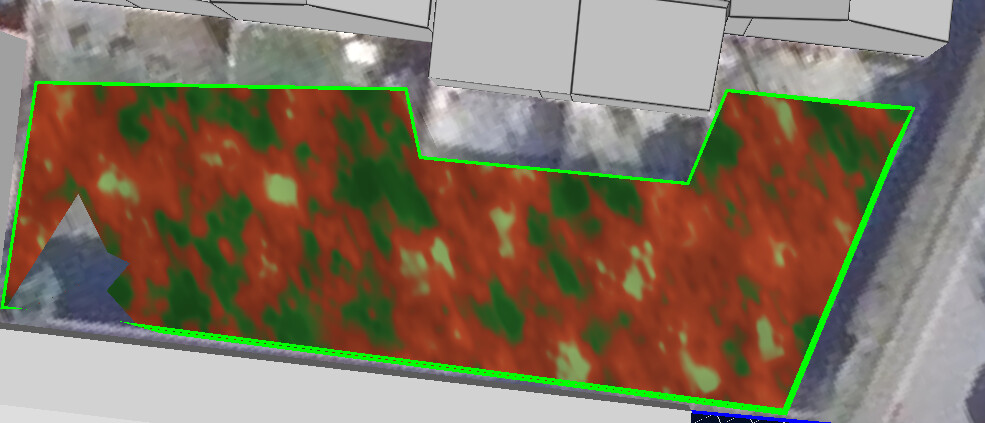
I try to create a material for a vertical wall, but i am struggling with the correct way to define it, since whatever i try, i am just getting stripes on it. Worth to mention is, i am using a vertical polygon, so a Cesium primitive to assign the material.
The polygon is coming from GeoJSON like this:
{

        type: 'Feature',
        geometry: {
          type: 'Polygon',
          coordinates: [
            [
              [4.725512471801164, 50.88101331210589, 34.04014368685602],
              [4.725513347194739, 50.8810129046137, 42.76989201868262],
              [4.725652873658409, 50.880958198909866, 42.71970368259534],
              [4.725654056530405, 50.88095773512771, 33.74971261545709],
              [4.725512471801164, 50.88101331210589, 34.04014368685602],
            ],
          ],
        },
        properties: {
          materialType: 'greenwall',
        }
}
What i have so far is:
primitive.appearance.material = new Material({

      translucent: false,

      fabric: {

        type: 'GreenWall',

        uniforms: {

          leafColorDark: new Color(0.1, 0.35, 0.1, 1.0),

          leafColorLight: new Color(0.4, 0.8, 0.3, 1.0),

          redPlantDark: new Color(0.5, 0.15, 0.08, 1.0),

          redPlantLight: new Color(0.8, 0.3, 0.15, 1.0),

          scale: new Cartesian2(8.0, 3.0),

        },

        source: `

          // Simple noise function

          float hash(vec2 p) {

            return fract(sin(dot(p, vec2(127.1, 311.7))) * 43758.5453);

          }

          float noise(vec2 p) {

            vec2 i = floor(p);

            vec2 f = fract(p);

            f = f * f * (3.0 - 2.0 * f);

            float a = hash(i);

            float b = hash(i + vec2(1.0, 0.0));

            float c = hash(i + vec2(0.0, 1.0));

            float d = hash(i + vec2(1.0, 1.0));

            return mix(mix(a, b, f.x), mix(c, d, f.x), f.y);

          }

          czm_material czm_getMaterial(czm_materialInput materialInput) {

            czm_material material = czm_getDefaultMaterial(materialInput);

            vec2 st = materialInput.st;

            // Texture coordinates for detail

            vec2 texSt = vec2(st.x * scale.x, st.y * scale.y);

            // High frequency noise for plant detail

            float n1 = noise(texSt * 3.0);

            float n2 = noise(texSt * 7.0);

            float n3 = noise(texSt * 15.0);

            // Combine noise layers for both detail and plant type variation

            float detail = n1 * 0.5 + n2 * 0.3 + n3 * 0.2;

            float plantType = detail; // Use same noise for plant type

            // Define colors

            vec3 green1 = leafColorDark.rgb;

            vec3 green2 = leafColorLight.rgb;

            vec3 red1 = redPlantDark.rgb;

            vec3 red2 = redPlantLight.rgb;

            vec3 mix1 = vec3(0.15, 0.4, 0.12);

            vec3 mix2 = vec3(0.65, 0.8, 0.45);

            // Selectors based on noise (creates organic patches)

            float isRed = smoothstep(0.3, 0.5, plantType);

            float isMix = smoothstep(0.65, 0.8, plantType);

            // Choose color pair

            vec3 c1 = mix(green1, red1, isRed);

            c1 = mix(c1, mix1, isMix);

            vec3 c2 = mix(green2, red2, isRed);

            c2 = mix(c2, mix2, isMix);

            // Mix colors based on noise

            vec3 plantColor = mix(c1, c2, smoothstep(0.2, 0.8, plantType));

            // Add shadow variation

            float shadow = noise(texSt * 5.0 + 10.0);

            plantColor *= 0.75 + 0.25 * shadow;

            // Lighting

            vec3 normal = normalize(materialInput.normalEC);

            vec3 lightDir = normalize(czm_sunDirectionEC);

            float diffuse = max(dot(normal, lightDir), 0.3);

            material.diffuse = plantColor * diffuse;

            material.specular = 0.05;

            material.shininess = 3.0;

            material.alpha = 1.0;

            return material;

          }

        `,

      },

    });
But i always receive something like that here:

Applying the same material to a horizontal polygon, lying on the ground for instance works. So i assume it has something to do with the z-coordinates and not handling them correctly.
Has someone an idea on how to tackle that?
BR Thomas