TextureCoordPositions and CesiumClassification Type.BOTH cannot take effect simultaneously

I have a requirement to display a complete image of a polygon on terrain and 3D Tiles. Since the polygon is irregular, I need to define textureCoordinates. However, after adding them, the ClassificationType.BOTHbecomes ineffective.

const entity = new Cesium.Entity({
polygon: {
hierarchy: new Cesium.CallbackProperty(() => {
return new Cesium.PolygonHierarchy(positions);
}, false),
material: new Cesium.ImageMaterialProperty({
image: image1,
transparent: true,
}),
classificationType: Cesium.ClassificationType.BOTH,
extrudedHeight: 0,
height: 0,
textureCoordinates: new Cesium.PolygonHierarchy([
new Cesium.Cartesian2(0, 0),
new Cesium.Cartesian2(1, 0),
new Cesium.Cartesian2(1, 1),
new Cesium.Cartesian2(0, 1),
]),
},
});
viewer.entities.add(entity);

Another test: using a primitive and also adding textureCoordinates. The terrain and 3D Tiles are covered, but the material is not displayed completely.

// I need custom display effects, so I defined a shader.
const appearance = new Cesium.MaterialAppearance({
material: const material = new Cesium.Material({
fabric: {
type: “custom1”,
uniforms: {
image: image1,
},
source: shader1,
},
translucent: false,
}),
});
const uvs = [0, 0, 1, 0, 1, 1, 0, 1];
const textureCoordPositions = ;
for (let i = 0; i < positions.length; i++) {
const u = uvs[i * 2];
const v = uvs[i * 2 + 1];
textureCoordPositions.push(new Cesium.Cartesian2(u, v));
}

let instance = new Cesium.GeometryInstance({
geometry: new Cesium.PolygonGeometry({
polygonHierarchy: new Cesium.PolygonHierarchy(positions),
extrudedHeight: 0,
perPositionHeight: true,
vertexFormat:
Cesium.MaterialAppearance.MaterialSupport.TEXTURED.vertexFormat,
textureCoordinates: {
positions: [
new Cesium.Cartesian2(0, 0),
new Cesium.Cartesian2(1, 0),
new Cesium.Cartesian2(1, 1),
new Cesium.Cartesian2(0, 1),
],
},
}),
});

const primitive = new Cesium.GroundPrimitive({
appearance: this.appearance,
geometryInstances: instance,
asynchronous: false,
});

viewer.scene.primitives.add(primitive);
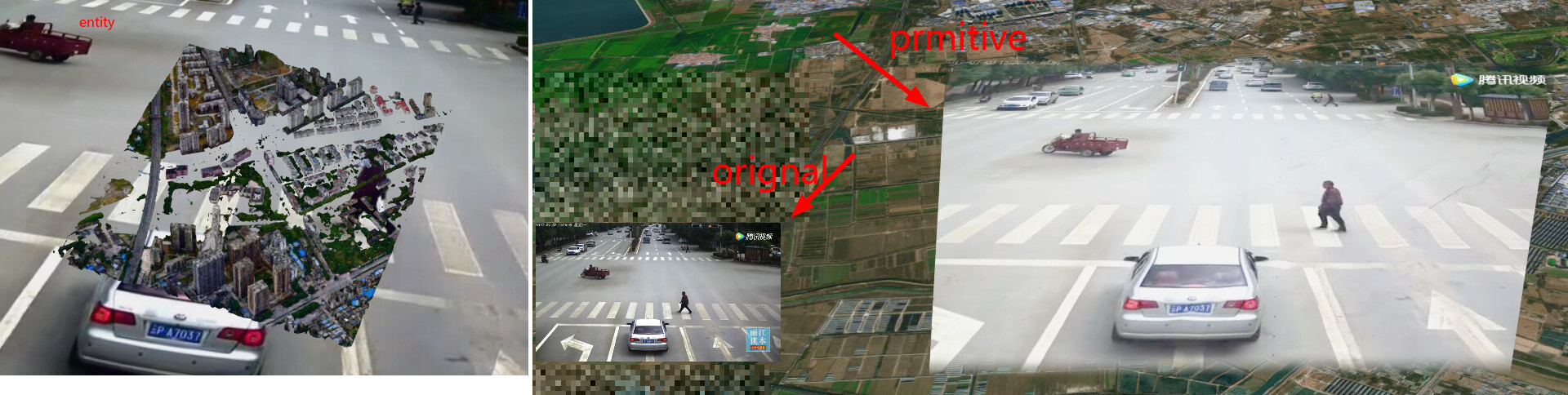
The core issue is still that terrain draping and textureCoordinatescannot be enabled simultaneously.
I prefer primitive, it can customize the shape through material
How to solve this problem?

Hi @cnfczn,
Thanks for your post and welcome to the Cesium community.

I am sorry you have run into difficulties creating your desired scene in Cesium. It is not completely clear to me from your screenshots and code snippets what exactly you are trying to achieve.

It looks like you are trying to add an image (with the road, car and pedestrian crossing) into a scene that has terrain and 3D Tiles for added context, is that correct? It is possible there is a simpler approach with the Cesium API to achieve your end goal.

To help us understand your issue and assist you, it would be helpful if you would try to recreate your code (working as much as possible) in our sandcastle tool https://sandcastle.cesium.com/ (dummy data is fine).

We hope to address your problem soon.
Thanks,
Luke

Hi @Luke_McKinstry ,

Thanks again for your helpful suggestions. I’ve created a Sandcastle example to demonstrate the issue I was facing. You can access it here:

sandcastle

As shown in the demo above, both the entity and primitive are overlaying the 3D Tiles, but the vertices aren’t in the right positions. The image is cut off and doesn’t fill the quad properly.

As I’m new to Cesium, I’m very grateful for the community’s support. Any feedback would be highly appreciated!

This might be a similar problem originally reported in "textureCoordinates" not working with dynamic polygon. · Issue #11845 · CesiumGS/cesium · GitHub

In your sandcastle, the texture coordinates are ignored. Try changing them to different values, it doesn’t change anything. If you set height to something, the texture coordinates work again, but then the draping does not work anymore. This seems like a Cesium bug to me.

This is incredibly helpful, thank you for linking the relevant issue! It confirms the core of my problem: I require both proper drapingonto the 3D Tiles and controlled textureCoordinatesfor correct image mapping. Currently, it seems I have to choose one at the expense of the other, which explains the incomplete projection. I’ll definitely follow the progress on this. I appreciate you taking the time to look into it!

1 Like